Sunday, May 20, 2012

Apps I use on my Nokia Lumia

Once in a while a device comes in that you just love, and makes you feel special. Nokia Lumia 800, for me, has been just that. It is simply the most beautiful piece of electronic craft made. And it has been about five months that I have been using this device. So, this is probably good time to give you an idea of the apps that I use on my Lumia device on day-to-day basis.

IMG_4776

OS Apps

Now usually one would forget about these ‘Apps’, but these are actually the apps we use most on daily basis. The phone app, the contacts app (people’s hub), the calendar app, the e-mail app (linked mail-box) and browser app (IE 9) are the ones that I use the most. And I would safely guess that this is the case with most. Naturally, using these apps built into the OS is the first hand experience that you would get of any platform. And I must say that the experience here is absolutely premium, perfect and pleasing.

The second set of OS apps, that I use less regularly are: music hub (Zune and others), picture hub (camera app and others) and of-course the office hub (more on this later in the post). I am very much pleased with the design of music hub, but at the same time miss some important things: An equalizer and ability to create on-device playlists. The camera is good, but the app asks for more usability: the controls are simply not easily accessible. I would, in fact, call out on camera app and make it standout as an outlier in the whole of the Metrofied design world of Windows Phone. It needs a serious re-design.

Productivity

I love OneNote. And I use it extensively. To have it exclusively available in Office Hub was one of the prime reasons for me to choose Windows Phone 7 over other platforms. Though OneNote is quite well done in its mobile version, there are some of the things I miss : save web clip, insert video clip; stuff that I need to get my work done. I do use other Apps: Word and PowerPoint, Evernote, Adobe reader, kindle reader and the amazing offline Dictionary.com app, PC Remote Pro and SSH Client Pro, handyscan. Apart from these I also regularly use Skype, the Weather app and the World time app all of which are well designed and very useful for me. Intermittently, I use the Sports tracker to see how much of my walking/cycling skills have improved Winking smile 

imageimageimageimageimageimageimageimageimageimageimage

Development

Not much to say here except to say that I just love the concept of TouchDevelop. There is nothing on other platforms that brings back the joy of programming the way TouchDevelop does. And that too, you just need your smartphone for your perfect program. Although, I would entirely leave it to you, if you actually want to take up coding. Although, if you ever want to give it a try, TouchDevelop will be a no barrier fun programming experience. To see the ‘scripps’ (script apps, the term I just coined Winking smile ) I have written visit: https://www.touchdevelop.com/wblh

image

Photography

As I said before, I simply don't like the inbuilt camera interface. There is a lot to be improved here. Hopefully Nokia can do something about it. In the meantime though, there are some excellent photo editing apps that I regularly use: Nokia Creative studio, Thumba photo editor, InstaCam and PhotoFunia. I also regularly use Flickr to upload my photos.

imageimageimageimage

Video

The inbuilt cam-coder is good enough. What is missing however is a good in device movie editor like Windows moviemaker. This is very much desired if we are to be able to post edited videos on social media. Without this, strangely, the so-called social features of Windows Phone are incomplete.

Games

Before I got my Nokia Lumia, I hardly used to play games. But this Windows Phone hooked me to many games. And, no, Angry Birds is not one of them (though I have it installed on my phone anyways). The games I love most are: Wordament, Shuffle Party, Breeze and occasionally Chess4All and Packman 7. The Xbox integration seems also to be well done, although I personally don't use one.

imageimageimageimageimage

Social

For Twitter and Facebook, I simply use the People’s Hub. With groups and contact live tiles, this is simply what I need to stay connected on these social networks. There are official apps for Twitter and Facebook, but I simply do not feel the need for them, at least for now. I also use Foursquare and LinkedIn app which are far superior in design and usability when compared to other platforms.

imageimage

The Special Nokia Apps

I regularly use Nokia Maps and Nokia Transport. Nokia Drive is also used occasionally. All these apps are exceptionally useful and are simply not available on other platforms; for that matter even WP7 phones from other manufactures. This was also one of the reasons I chose to get a Lumia device when switching over to WP7.

Music and Instruments

I love to hear instrumentals and especially Indian classical. Zune, with music got from flipkart does the job for me. I occasionally use the inbuilt radio app, the TuneIn Radio (for BBC), SoundHound and PrimeTube (for Youtube). I also love fiddling around with instruments so I use PianoPhone 7, Honey Guitar, Drum Kit and Synth Free. Hopefully, one day, I can create something interesting like this:

Metro : Track created using free Windows Phone apps

imageimageimageimageimageimage

Local Apps

These are apps that are probably of relevance to only Indian users. I regularly use Zomato (the design is just too buttery and the operation smooth) and occasionally Flipkart, ebay India and IndianRail app.

imageimageimageimage

Misc.

Some of the apps that I don’t regularly use but are quite handy and sometimes just fun: Flashligh X, SkyDrive (I use office hub integration), Google search app, Microsoft Academic Search, Face Swap and Face Mask, Fantasia Painter Free, Function Plotter and Jack of Tools.

imageimageimageimageimageimageimageimageimage

Endnote:

1) A lot of people crib about windows phone not having enough apps. After using Nokia Lumia for about five months, I can surely say that windows phone is not short of quality apps that you will *actually use*.

2) Two things I miss is official Google Maps and GTalk app. While there are alternative third party apps, they are not exactly of great quality. While Nokia maps can be any day be substituted for Google Maps, GTalk integration to People’s Hub would be great.

3) All icons used here are owned by respective owners of the apps and are reproduced here for information purpose only.

Sunday, April 15, 2012

Why a Nokia Asha priced above 5K INR makes no sense?

Along with the flagship Lumia devices, Nokia had released a set of Asha devices dubbed as the Internet device for the next billion. While the Lumia devices have a very clear consumer target, the Asha promise sounds good, if the price factor is kept. That simply dosen't appear to be the case with any of the Asha 3xx series. All of these are priced above 5K and at these prices you can easily buy a fully featured Android Smartphone with much better set of features. Where Asha 3xx series scores is the build quality, the camera and probably battery life. But Nokia has squarely failed to understand that it is also the ecosystem that matters. And, in places like India, people are increasingly wanting smartphone features (not smartphone like) on devices close to 5K mark.

S40 is a pretty dated OS, with virtually no exiting thirdpary application for the platform (sorry, but I don't consider a dumbed down version of Angry Birds as an important application). Moreover, it lacks any sensor or GPS support. At the same price point as Asha 3xx series you could easily get a fully loaded Samsung Galaxy Y with Android 2.3.x (hopefully 4.x is also on the way for this device). Feature and usability wise the later device simply beats the Asha 3xx series. I have hard time figuring out just what Nokia is upto here with these 'smarterphone' device. To me, it merely appears to be a marketing gimmick that is going to fail to impress majority of budget minded Indian customers.

While I would happily recommend an Asha 2xx device, if you are even considering getting a Asha 3xx, I would strongly recommend a Samsung Galaxy Y. Heck, you could even think of buying a new Micromax Funbook paired with a very basic Nokia 101 phone for actually making calls.

Saturday, March 10, 2012

Travelling only with the Nokia Lumia

I do love to experiment with new gadgets, but I only buy the once that I use primarily to get my work done. So when I got the Lumia, my purpose was to replace my phone, laptop, camera and to some extent the Asus T91 while travelling. Basically I just wanted to have one descent device that has all the functionalities that I need to get my work done.

Office on the go
So I recently travelled to IITK to attend a conference. My first ever software engineering conference. And I enjoyed it, and met quite a few interesting people out there :)
Usually when I go to conferences, I carry my Asus T91 MT along with me. But this time around I wanted to deliberately travel light. So the only device I took with me was the Nokia Lumia 800. On my tablet I usually use OneNote to take down notes and occasionally record interesting talks. This has always worked out great for me. And with a battery life of about 6 hours for the tablet, the thing easily lasts for a day of the conference without any charging cycle.
The Lumia comes with Windows Phone 7.5, whose Office hub did a great job of replacing my tablet for the trip. There is one major difference however: on my tablet I almost never used the on-screen keyboard to take notes, I have always preferred using the pen stylus to actually write down stuff with OneNote. On the Lumia I have to use the on-screen keyboard to key in the notes, the keyboard and the predictive text is pretty good at this job though. So basically all went well for the note taking part. The same was true for the camera. I never missed my DSLR. That, it is another matter that I didn't actually go for any outings. The only photography I did was some at conference and a few more while wandering in the beautiful IITK campus.

Irctc disaster
For the onward journey we could only manage to book a sleeper class ticket. And I had no clue what we were landing ourselves into: people with overloaded luggage, people without tickets, a commercial break after every minute (believe me this was even worse than watching a movie on prime time), and the most spectacular event of one Babloo-bahia jumping of running train and the rest of the family also wanting to execute the superman's act :)
That was more than enough motivation for me and my friend to get a tatkal ticket in AC compartment for the return journey. Believing that Irctc (the railways unit that handles online reservation) has a great mobile site (http://irctc.co.in/mobile), I started the booking process. The Lumia has a nice browser and is fairly easy to use and get the work done. But somewhere in between the reservation process the site decides to totally give up, showing me same screen again and again. At this point I had to call it a day, call up a friend on campus and rush to his room with a loaned cycle from another friend (thanks apr :) ). But by the time I restarted my reservation, all the seats were gone ! And I eventually ended up booking on the next train, but using a Windows laptop.

Email and stuff
This is just cheese. All my accounts (work and personal) just works out of box. The best part is of course the people hub with the goodies of social integration. And with IE9 just about the whole Internet (sans the flash and silverlight crap) is at your finger tips.

Programming?
Yes I enjoy the fact that I can write for the phone on the move using TouchDevelop (https://www.touchdevelop.com/wblh)

Battery life
This is one issue which has been sour spot for many Nokia Lumia users. However, this was never the case of problem with me, even then the good guys at Nokia care replaced my initial unit. I got fairly good battery life on roaming with mobile data (EDGE) switched on. Typically the charge lasted for about 24 hrs, with occasional use of the GPS for sports tracker (went cycling in morning around the IITK campus). I guess, with the latest updates to the firmware, Nokia has addressed most of the issues with battery life.

Note: This post was entirely written on Nokia Lumia using the IE9 browser and the standard blogger interface. Slight editing was then done on my desktop.

Sunday, March 04, 2012

MeTA Studio online update : portable workspaces

A new online update to MeTA Studio is now available for download. The current version is 2.0.04032012.


Use (Help -> Check for updates) to get the updates. If you are not able to use the online update, manually download and extract: http://metastudio.googlecode.com/files/metaupdate.zip in the meta/bin directory.

Major changes:
  - New tracker glyph (now these are dotted lines and are more differentiable from the bond lines)
  - Workspaces are now easily portable. You can easily copy the workspace directory across machines. For existing workspaces, simply edit .mws file to remove reference to any absolute paths. If you need any help in this regard please file an issue at: http://code.google.com/p/metastudio/issues/list and I will revert back.

Have a nice week ahead :)

Sunday, February 19, 2012

Some fun with TouchDevelop and MeTA Studio: scan molecules ;)

Ok so I had some more fun with TouchDevelop. This time a bit serious one ;)

I have been writing a script on my Nokia Lumia using TouchDevelop that allows one to scan a molecule drawing (either using a camera or pre-stored image) and then obtain approximate 2D coordinates with some basic on-device editing. The coordinates can then be emailed to yourself (or ur friends). So now, this script is kind of usable, at least for simple molecule drawings. The script (called omr, fancy optical molecule recognition :) ) can be accessed from: https://www.touchdevelop.com/wdlx. Of course you will need a WP7 device to use this script.

The coordinates obtained can be directly imported in MeTA Studio by using the widget available here: http://code.google.com/p/metastudio/source/browse/trunk/metastudio/widgets/showMoleculeCoord.bsh
Once in MeTA Studio, you know what all can be done :)

[Disclaimer: The script is purely non-commercial, and comes with no support what-so-ever ;)]

Have fun!

Saturday, February 11, 2012

Photoshoping gone wrong ;)

I am not a photoshop expert. Well, neither I have used it! But just using and knowing photoshop is not good enough to fool around. You must know what you are actually mocking. So this image on spotify website caught my attention: http://www.spotify.com/int/mobile/overview/

Clearly the creator missed the fact that the Nokia phone shown is actually a Windows phone and not running Symbian! Fun to notice that :)

Saturday, February 04, 2012

Fun with 3D anaglyphs : TouchDevelop and MeTA Studio

I just enjoy writing stuff in TouchDevelop using my Nokia Lumia. So this time I wanted to write an app that generates on-device anaglyphs using two images (left and right channel photos). To use this script (3DCAM) head straight to : https://www.touchdevelop.com/gxtp on your Windows Phone.


The resolution of final images from the above script is not that high though. So if you want to make anaglyphs from the images taken from your DSLR, you would like to try a script I hacked together for MeTA Studio (available at: http://code.google.com/p/metastudio/source/browse/trunk/metastudio/apps/3danaglyph/anaglyph.bsh?spec=svn544&r=544)
A few tips while taking 3d photos:
  • steady hands! or else use a tripod
  • images whose background doesn’t change gives more depth feeling
  • if the background is changing the images might not give the ‘real world’ feel
  • subjects of interest must also be stationary
  • the closer the object, the more displacement you will need for taking the left and right channel images
To see some of my initial trials head to: http://www.flickr.com/photos/tovganesh/sets/72157629179484577/

You will need red-cyan glasses to view these images. To make your own red-cyan glasses, the following youtube video will server as a good starting point (http://www.youtube.com/watch?v=sIEn9z0oBE8):


Have a nice week ahead!

Monday, January 30, 2012

MeTA Studio maintenance release

A maintenance release of MeTA Studio is avilable via online update (Help -> Check for updates). The current version number is 2.0.31012012

If you are not able to use the online update, manually download and extract: http://metastudio.googlecode.com/files/metaupdate.zip in the meta/bin directory.

There are a number of bug fixes in this release. It also adds support for .mol2 files. Many features are still work in progress (chemnotes, app creator etc.), so expect more updates down the line.

Saturday, January 28, 2012

Kosh: Building a mobile user experience for myself ;-) - I

I have been a smartphone user ever since I went mobile, my first phone being a Symbian Phone. Since then I have, on daily basis used newer version of Symbian, Android (up till Gingerbread), and now I am loving the beauty and elegance of Windows Phone 7 (Mango) on my Lumia 800. Intermittently, I have also dabbled with iOS and Bada. None, however come close to the usability that Windows Phone currently provides. For those of you, who still don't 'get' the Metro UI, this post might enlighten a bit: http://spillwaybrain.wordpress.com/2011/11/10/why-windows/
My primary requirement from a Smartphone has been programmability, preferably on the phone itself. With Symbian, I really enjoyed the pys60 (http://sites.google.com/site/tovganesh/s60) and now with Windows Phone, I am having fun with TouchDevelop (https://www.touchdevelop.com/wblh), more on this in subsequent posts. With Android though, I just couldn’t get connected the same way.
While Windows Phone is a great OS, the current price point makes it unaffordable to large section of people. This may change over time, particularly in combination with Nokia. On the other hand, Samsung, with its Bada OS, plans to build a ‘smartphone for everyone’. However, with the current programming model for Bada, particularly the use of C++; doesn’t really go well with the philosophy. Because, to me a smartphone should not only be programmable by a professional third party, but also as easily by the owner of the device; just as is the case with the PC. When you have this joy of programming your own device, you kind of connect to the device for a long attachment, not just for period of your current contract (anyone remembers the BBC Micro?).

The Phone
Most smartphone designs today seem to forget that it is actually a phone. So making a phone call on a smartphone is typically much slower than on a very basic Nokia device. You can't just start keying in the number to give a call. You have to open the Phone App and then give a call. And in some designs you even have to press one extra button to bring up the dialer app! Oops that is a complicated phone, but we still like to call it smartphone, for some reason.
So the smartness comes from the fact that it is able to do a whole lot of other things than just being a phone, not that it is easier to make a phone call from it. It serves as a communication hub. It basically tries to provide a complete mobile computing experience in your pocket. Over time, probably we will use the phone component in it a lot lesser, and then it would be more technical to call it a smartmobile.
Another drawback of most smartphones today is the battery life: it is simply unacceptable. Though my current Nokia Lumia 800 easily lasts for a day and half of normal usage (always on data, few calls and text messages, occasional games, about half hour of GPS usage - for sports tracker), for it to be usable by a large majority of people in a nation like India, it needs to run on solar power or an alternate form of energy (body energy, crank shaft, anybody?). Currently, though I can see Solar energy as the only viable solution. This could be coupled with a crank shaft enabled charger, though my experience with a crank shaft device (Philips radio), has not been that great : probably it had a design flaw.  For most of the mobile devices today, the display is one of the components that consumes the maximum amount of power. Without the display these devices could go on easily for more than a week. Take for instance the Kindle, it can easily go for about 10 or more days, even with the 3G radio on; with the radio off it lasts for more than a month. The one major difference is the screen: e-ink. Although the e-ink looks fine for a book reader, for a mobile device it will not work out. Options would be to use color e-ink or PixelQi screen. The recent demonstration by the OLPC project [http://www.youtube.com/watch?v=ITHNbOrPQyM] shows some hope, but a lot of work needs to be done to make it to a device that can be held in your hands.
To design the right hardware would be a challenge. At this moment I am not very clear about what this hardware would be, so I will use followup posts to put in my thoughts on the hardware side.

The UI
So, I want a smartmobile, whose primary functions is to stay connected with the people you care about: friends, family and co-workers. The Metro UI, which I pretty much like, tries to do this with what is called as a People's Hub. This is a well though out piece of UI, which threads all your contacts, communication into a single place. This also connects to the social media, and brings up the latest updates of your friends.
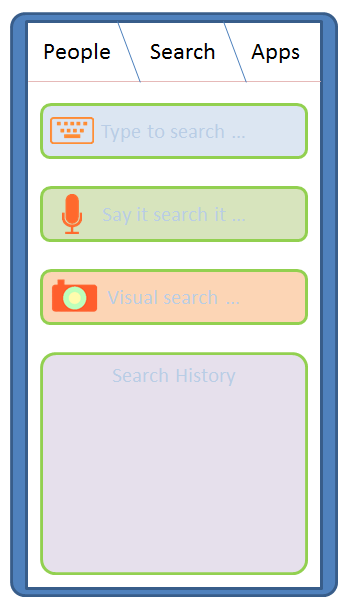
Taking cue from this, and observing how I use my mobile device, I think there are three most important things I do with a mobile device: Keep in touch with people, Search for information and use Applications.

So let me introduce to you : Kosh (Sanskrit: a collection / repository)
It is a collection of things I do:
  • People Kosh : The collection of all tools allowing one to connect to people. The Kosh UI is always accessible from anywhere (if using a full screen application), by using a Swipe down gesture. People Kosh needs only three main components: Phone (which includes VOIP / video calls), Message (which includes SMS and Email) and Social updates (a quick way to be in touch with people on your social networks). The Phone and Message Apps are also 'live tiles'. Unlike Windows Phone 7, they will display additional information, such as from whom you missed the last call, last line from the text message you received recently etc.
metro-phone
  • Search Kosh: The collection of all search tools. This will be central place to search anything (well probably some things in life are still better searched on your own ;) ) : either on the phone, or the Internet. The search can be either text based [input: on-screen keyboard], voice based [input: microphone, audio file] (this will not be just voice recognition, but should be localized, and probably should integrate music search, radio search etc.) and visual [image, camera] (scan image, photo, QR code, bar code and probably video clip).
  • Apps Kosh: The collection of all apps. Device status like remaining battery, Network connectivity are just another apps. One need not have integrated UI for the same. Each icon acts as a means to launch the application. By default the icons are alphabetically organized (as grid of or as a list). Application icons may display notifications. Notifications can be in the form of text or image or a combination of the two, and are displayed alternatively or along with the default icon. Icons with notifications automatically move up and have a glow surrounding them. Once the user taps the apps with notification to open, the icons are automatically placed in their usual location.
    To switch between Apps, use three finger pinch. This will show a list of 'active apps' with end of the list being signified by a shadow on the edge. An active app is not the same as a background app : in fact, on a constrained device it would not be really a good idea. An active app here, is the one that has registered to the system for a background notification. Alternatively the only app that is available 'in memory' is the foreground application. The applications that require background processing (play music, for instance) will be handled by a system process instead.

The Architecture
Well, I want to build the full stack. That is because whatever is currently available is probably not going to work for me. It is not only important to get the kernel done right, but also the rest of the components done well to make for a great user experience (UE). The diagram below shows the most important components of this stack.


The Kosh system will be build on a mirco-kernel architecture. This would mean the Linux (or Android / Palm OS ) kernel would not be a good starting point. A QNX like kernel would be the way to go. The other components are the telephony and network layer, specifically for handling the communication needs. The system process for notification and other management purposes. The Kosh API layer for providing APIs for the UI layer as well as writing third party applications.


The Kosh API layer will have the above major components. I think for all that I outlined about, these set of broad APIs would be just enogh to start with. The UI layer will be build using these APIs and a WebKit based (or WebKit like) rendering engine. This essentially means all user interface layer will be build on HTML 5+ and JavaScript. Consequently, the Kosh APIs will be exposed as JavaScript. Also all the third party apps will be written using HTML and JavaScript. This is a philosophy quite akin to webOS. Essentially this means that EnyoJS might be a good starting point for looking at API design. Another project to look at is Mozzila B2G, the  Boot to Gecko initiative.

A carrier independent network
We are over reliant on the 'carrier network' for all the communication today. Though 'carrier networks' will not disappear overnight, it would be good to have a way of communication that does not rely on a centralizer carrier.That would allow for a medium of communication which is not overlay regulated. For emergency needs though, a carrier or satellite based solution is still required. Irrespective of this, for me, communication among humans should ideally be free, that is what takes the race ahead. At the moment though this is not exactly the case. There is the Internet, that was supposed to be a free medium, but due to one component: the DNS, it could be unfairly controlled. TCP does allow peer-to-peer communication, with no centralized control, but again for people to 'find' each other, we need a kind of directory service. Skype for instance uses peer-to-peer communication, but requires a central authenticating authority. A few years ago, Nokia, experimented with peer-to-peer, proximity communication, using an application called Sensor. The Sensor application (still available for old Symbian), used the Bluetooth as a means of communicating with people in proximity (instead of directly talking to each other!). The Sensor app would host a mobile page of you (like your facebook page), people could see this from their apps and if they like, send message to you, and probably become friends. Sounded like a pretty good idea, but somehow did not catchup, and the project seems to be abandoned altogether, at least for now.


I think, at least for local communication needs, one can setup a peer-to-peer communication system that is independent of any infrastructure. Every device in this system behaves as a carrier. Consider that everyone owns such a device. Also, in a modern city, I think it would be safe to assume that every person will find at least another person with in 10 meters radius (this is just a hypothesis right now, a proof for this would be amazing). All the devices in this system will have a unique number, and will be owned by a person. Every device will have a public and private key for the purpose of security. Now consider that a person wants to send a message to his mate. The way this would work out is as follows:
  • The sender knows the public key and the device identifier of the receiver. For this to happen, both the sender and receiver should have met physically and exchanged this information once.
  • A message packet is prepared with the device identifier, and the content encrypted using public key.
  • In addition, the message packet will contain a field for signifying the importance along with a hop counter. At the source, the importance field will have the highest value, while the hop counter will be zero. Every second hop a packet makes the importance is decremented by one, where as the hop counter is incremented with each hop.
  • The message is then broadcasted to all the nearby (say with in 10 meters radius) devices.
  • If any of these devices is the intended device, the process completes. There still might be lingering packets in the network carrying the original message, these will eventually die as their importance decreases.
  • If the importance field of the message packet reaches a negative value, it is not re-broadcasted, else it is re-broadcasted.
The above is quite akin to the way messages were transmitted in olden days (that were not from Kings). I think this should work wonderfully if the density of the device is sufficient, though at this point I don't have a proof of what this sufficient number should be.
One drawback of this system is power requirement. I am not sure a device that would handle this amount of traffic can last for long, given today's battery technology: the radio (apart from the display) is a major power guzzler.

Alternative positioning
While the GPS works great where I live, and I am actually pleasantly surprised by the accuracy of Nokia Drive app on my Lumia, there is a need for a cheaper solution that will work even if the satellites are out of visibility. Nokia Lumia and most other modern smartphones supports A-GPS, which augments the satellite positioning with other information such as cellular tower positions, wifi hotspots and the IP address of your device to give pretty accurate positioning information.
Another approach would be to use landmarks as a way of positioning. This would basically involve the use camera and some image processing. The device will store information on the known landmarks and their positions. The stream shot coming from the camera will be mapped on to the available landmarks and approximate position calculated. A system like thing, might not be good for turn-by-turn navigation, but will be useful if your are walking or cycling and you want to roughly know your current location. Again, this is not a substitute for GPS, which also provides altitude information, but then for day-to-day use this might just work out.

Programming Model and On-device programming
Kosh will be using HTML + JavaScript for user level programs. Any hardware level code will be written using pure C.
The most challenging aspect, though is to create an On-device programming environment that is easy to use, but also powerful to take full advantage of the capabilities of the device. In my earlier post on Nokia Lumia, I had mentioned about TouchDevelop from Microsoft Research. This is terrific on-device programming environment and I have not found anything yet that comes even close to this. This is one environment that makes me love the Lumia (to see stuff I am up to using TouchDevelop, visit: https://www.touchdevelop.com/wblh). 
To make Kosh really interesting an on-device programming environment akin to TouchDevelop must be built.


References
[1] http://spillwaybrain.wordpress.com/2011/11/10/why-windows/
[2] http://enyojs.com/
[3] http://www.eink.com/display_products_triton.html
[4] http://www.pixelqi.com/products
[5] http://www.qnx.com/products/neutrino-rtos/index.html
[6] http://www.webkit.org/
[7] Wiki on Nokia Sensor: http://en.wikipedia.org/wiki/Nokia_Sensor
[8] Mozilla Mobile web OS: https://wiki.mozilla.org/B2G

Followup
At this point, I only have idea. Not a single line of code to show. But to start it up, I had to write this down. This is just a beginning of the things to come, and hopefully you will love it too :)

Fine Print
The ideas, text and graphics in this post are exclusively created and owned by the author. The templates for few icons in the post are taken from a Google image search, they were then suitably modified for my needs. All the above content, and any followup posts with the label "kosh" is henceforth made available under Creative Commons License (http://creativecommons.org/licenses/by/3.0/) and may be attributed as : Kosh, by V. Ganesh.
The text also contains references to product names, and are trademarks of respective organizations. They are used in the text for information purpose only.

Wednesday, January 25, 2012

An inside look at one of the first popular smartphones: Nokia 6600

The first ever mobile phone I owned was in fact a Smartphone: Nokia 6600. This was one of the best phones available at one time, in terms of cpu, memory and availability of installable 3rd party applications. It even had a modern day browser: Opera Mobile. Was just a perfect piece of hardware: but lacked 3G. And then the advent of iPhone just made it look too lame. I always wanted to have a look inside this smartphone to see what chips make it tick. So, finally I took apart the circuit board of 6600. It has a 104MHz ARM processor, with onboard RAM of 10MB. There is also internal storage chips which I guess is either 16MB or 32MB. Pretty low specs compared to what I have on my Lumia 800 (which has almost comparable hardware to my Asus t91mt – except on the RAM front).

IMG_2755

IMG_2756

A photo … and a national day that two nations share

IMG_4269_edit
It is republic day in India again. And I was pleasantly greeted by this tri-color on my Lumia this morning. Happy Republic Day!
Today is also the Australia Day,  so warm wishes to my Oz friends. I remember, discovering this for the first time few years ago when I was in Oz, that we share the same day as our national day. It was also the first time I was out of India on a republic day, but knowing that the other land also shared a national day, made it sweet Smile.

|| वसुधैव कुतुंबकं || ( vasudhaiv kutumbakam )

Sunday, January 22, 2012

A test post from Nokia Lumia

This is just a test post from my Nokia Lumia. Just to say that it works great. And the onscreen keyboard is just too good even for writing a long enogh post.
Just loving this :)

Sunday, December 18, 2011

Back to Nokia, with a Lumia!

IMG_4261_copyIMG_4256_copy
Well yes, somehow I convinced (rather spoiled) myself into buying this device. I was just to frustrated with my current Android device and I had no plans on falling back on Nokia E51 (the Symbian device that I used before). Well in the process I actually cleared up my digital inventory: essentially sold off my laptop (to get some funds Smile with tongue out). So now I am reduced to this stunning new Nokia Lumia, my Asus t91mt and the regular desktop.
There was good reason to do that. I seem to be carrying a lot of “digital burden” with me. Particularly the laptop. At home I use Windows on desktop (with Ubuntu running as virtual machine). And when my desktop is being used by my parents, I use my Asus t91mt. At work I almost exclusively use Linux. I need a Windows machine mainly to take notes (I use OneNote) and if I need to make presentations or use Word. Since I don’t have a Windows machine at work, I mostly tried to use my personal laptop for this purpose. I also tried using Google docs, but it simply doesn’t meet my needs. And carrying the laptop was a pain for everyday travel. I wanted my phone instead to do the task, but it simply wouldn’t work the way I wanted. Moreover, it was simply problematic : the more I tried to use it, the more it crashed. Eventually, I found one smartphone that could do it all: the elegantly build Nokia Lumia with Windows Mango OS, and Office App built right into the device.

On the face: Beautiful, and Wow
Nokia knows how to build the hardware that blends seamlessly with the software. The Lumia 800 (I still think Nokia should not have put that number and just made one product with the name Lumia), has a stunningly beautiful, unibody polycarbonate casing with curved AMOLED corning gorilla glass display. To sum up all the jargon: its a beautifully designed solid product, with a soul in it.
WP_000006_copy
Even the power adapter is nicely designed. It is slim as a plug, and you don’t even feel its an adapter. My only complaint is that it should have been black for a black phone, or they should have made a white Lumia.
And then there is this wow factor. The Windows Phone Mango adds the needed sweetness on the top of that wow factor. The Metro UI is a refreshing break from static icons of iOS and Android. Though one may say that Widgets do the same thing as Live tiles : it is not. Widgets are battery hog on Android, Live tiles are not.

Below the skin: pleasantly useful and gets the work done
A lot has been said about the “gets the work done” for Windows Phone and I can say this again. I have all that I need out-of-box. It connects to GMail, Hotmail and Yahoo without the need for any app download. Twitter and Facebook is supported on the phone : no apps needed if you are happy with basic functionality.
I use OneNote a lot, and the integrated Office Hub is a treat of usability for me. This is kind of “must have” functionality for me and Windows Phone does it just right.
The other application I use a lot is Maps. Although the Lumia comes with Nokia maps and you can download a third-party Google maps app from Windows Phone market place, I miss one feature: ability to search for public transport routes. The Nokia maps seems to support this, though it doesn’t seem to work in the place I live.
And most importantly: the device has no lag even when using it with loads of apps or browsing a number of sites. This is remarkably better than any Android device that I have used so far.


Apps and all
Generally all the reviews on the Internet these days are all praise for Windows Phone, except one thing: the selection of Apps. After using the windows phone marketplace, I don’t think I fully agree. I found my most used app on the other platform in the marketplace. Moreover, these are more beautifully designed than the once available on other platform. Sure the number of Apps in marketplace is smaller, but definitely not the quality, they are simply superior.
Not everything is rosy though. Two main sour points are: Skype is entirely missing (though I hope this will soon get resolved as now Microsoft itself has purchased the company) and Adobe reader (while on all other platforms this has been updated to X, marketplace still has the older 9.0 version .. thats lame).

The Camera
WP_000004WP_000005
The camera performance is reasonable for my needs to do casual photography. For serious needs I do have a DSLR. Of-course it is just unfair to compare this camera with my DSLR for quality, but Nokia could probably have done a better job at handling scenes with low light conditions. I also could not find a way to correct for “red-eyes” within the Camera application.  There is no auto-panorama on the default camera app, but you can get an App from the marketplace that does a pretty good job for this.

Sound and Music
Zune player on the phone is a nicely integrated app. The “music+videos” hub really makes it interesting as it not only integrates the radio, but also other online music services and related apps.
The speaker quality is what I would term as OK. The bundled headset is of good quality, but as with others, it slips from my ears (they just don’t get it that I am a good listener Winking smile).
On the Nokia Support site there were many complaints regarding sound quality when the headset is attached (either supplied or any other headset with 3.5mm connector). What I found is that it actually depends on the quality of the music file you are playing. With good quality mp3 files (the ones that I created from my own collection of CDs) had excellent response (even at the highest volume). This is not simply the case with another mp3 file I created from a cassette tape. It actually sounded better on my PC, but on the device it had this cracking sound as I increased the volume. This prompts me to think that this is more of an issue with the software that does the decoding. Hopefully a future software update will fix this.

Battery life
My usage of this phone has been quite heavy till now. So I can’t really judge the battery life in normal use. That said I got about 8 hours of continuous use with Wifi on. I will update this post as I get more idea of battery life on daily use basis.

[Update 1: I am still testing the battery life. But my normal use seems to last for about 24 hrs or more. Nokia also replaced my phone (without even me asking!), so I am actually happy :). Today I had put on the WiFi most of the time as I was writing scripts using TouchDevelop (see below). The battery lasted for about 8 hrs, that is sort of consistant with my heavy usage as observed earlier. ]

A new way to develop: TouchDevelop
image
My first ever phone was a Nokia 6600 (here) and then the Nokia E51 (here). After this I had a brief stint with Android platform (here). My primary requirement from any device has always been: programmability, apart from usability. I have been always hooked to the Nokais from day 1 because of the amazing programmability of these devices. I build a complete Quantum Chemistry program (mobihf : http://sites.google.com/site/tovganesh/s60) on it and even presented a paper on this work! I could not say the same for the Android platform, somehow I have been disappointed even before I used the platform (here and here). Although Android has an in device programming project (http://code.google.com/p/android-scripting/), it is not actually “officially supported”. Neither I got around to use this properly on my android device.
With Windows Phone, though, Microsoft Research has done a great job by releasing TouchDevelop (https://www.touchdevelop.com/help and http://research.microsoft.com/en-us/projects/touchdevelop/), a new way to program the device without a PC. On my Nokia Lumia, I was up and writing a simple graph plot script in not more than 15 mins (see this: https://www.touchdevelop.com/wblh). Although, I already have Windows Phone SDK installed on my desktop, I find programming on the device very interesting (as I have said this here and various other posts here), and is the only way to break from being dependent on the PC. This also gives you a feeling that you have complete control of the device and that you are not dependent on any third-party to get something done exactly the way you want it.
I think, Microsoft Research, with its TouchDevelop, has shown a way that this could be done. It may not be perfect, but this is probably the direction that we should take. Hope that this gets carried over to the forthcoming “Windows 8”, which would be quite a radical development.
In forthcoming posts, I hope to put in more efforts to cover TouchDevelop as I get more familiar with it and write more “fun” scripts Smile.

Connecting to the PC : Zune
zune-nokia-lumia
This is very simple. And as I have been already using the Zune player, I had no problems with connecting the device to the PC. Compared to Android (or Symbian) however, there is no way to expose the device storage as a filesystem on the PC. The Windows Phone is handled by Zune just the way iOS devices are handled by the iTunes player.

Nokia care: has it improved?
I had complained about my previous stint with Nokia Care (here). I am not sure of the current status. Though I must say that in-showroom experience of buying the Lumia was fantastic : very friendly and knowledgeable people.

In the end : would I recommend this?
Definitely. The major deciding factor for many would be the price. It would however offset if you look at it as a complete mobile computing device rather than just a phone, which is what it really is.

Friday, December 09, 2011

Changing times with the Rupee and the Paisa …

2011-12-10_12-27-51_851
Was thrilled to see these new coins with the new rupee marking Smile Also in the picture is the one paisa coin that is my constant companion, even though it was abandoned long before I was born. Hope that we can see the value of that one paisa grow up some day Winking smile
Enjoy the weekend !

webOS goes opensource :)

HP is making the webOS opensource and it intends to make it "pure opensource" as opposed to the "other" controlling project. The press release of the announcement is here: http://www.hp.com/hpinfo/newsroom/press/2011/111209xa.html?mtxs=rss-corp-news and http://developer.palm.com/blog/2011/12/open-source/

Hope this serves as a viable alternative to all the "corporate" managed mobile OSes. I would love to see a homebrew, DIY community sprung around this and create more interesting ecosystem around it with least central control.

Saturday, December 03, 2011

Mathematics add-in for OneNote

Okay this one is not only cool but very usable tool from Microsoft. If you use OneNote / Word and if you are into Science, you might find this tool very valuable. The mathematics add-in for Word / OneNote is available from Microsoft at: http://www.microsoft.com/download/en/details.aspx?id=17786

The tool combined with Tablet PC features (on my Asus t91) is quite a fun and addictive Smile

math-onenote

Saturday, October 22, 2011

Insanely helpful error message


Ofcourse, I don't see any harmony in the exception thrown !! ;)

(PS. Nokia, eagerly waiting to know when the WP7 devices are heading to India?)
(Update: So looks like, mostly probably Nokia WP7 is landing in India by the end of the year, ref: http://windowsteamblog.com/windows_phone/b/windowsphone/archive/2011/10/26/nokia-s-first-two-windows-phones-are-here-and-they-re-awesome.aspx. And in most probablity, I am gonna switch to one of the Lumia devices :) )