Showing posts with label android. Show all posts

Friday, June 05, 2020

Airtel, eSIM, loosing connectivity and moving to Android

It was the 3rd day of the lockdown. I had to walk down to my office late in the evening as a server had broken down, and there was no other option than for me to walk in there and fix the thing so that rest of my colleagues can still connect to work. After I came back home, I went to take a bath and then suddenly realised that there was no signal on my iPhone. I had no clue what was the reason. So I did the usual trouble shooting and then restarted the phone. Still no signal. Next I put the sim in my second phone with no SIM - Google Pixel 3a. Still nothing. I had actually got this phone for my uncle, but he somehow didn't like it so it came back to me.

After a lot of trial an error I reached my service provider - Airtel on Twitter. They are usually fast to respond. Over the DM I described the issue, and they took an alternative number to call me back. Thankfully wife's number was available - I am a single number person, but today I suddenly realised the importance of having more than one SIM, or atleast 2.

The Airtel techical person called back and after a bit of trouble shooting - gave this assessment- that my SIM card is damaged and needs to be replaced! But since currently all the offices are closed I will have to wait. Sigh.

I waited for 2 days for this to sink in and in the mean time asked every one of my colleague to either call me on Slack or Skype. Luckily I had added a Airtel Data SIM to my plan just over a week ago. So that I could put that into my iPad and my father could use it for his usual bit of news and article reading.

Even though I didn't have a phone connection at this moment, I didn't feel disconnected or unable to go about my normal work from home routine. All this, until I had to pay my credit card bill. My bank had recently changed their interface, which now forced one to enter an OTP sent to your registered mobile number to complete a transaction. Bummer. Panicked I called up my colleagues to ask if they would be ok to pay my bills if I am not able to pay my bills because of this uniquely strange situation I was in. At the same time I tried to check if I could use the BHIM app installed on my phone to pay the credit card bills, but it didn't work - because my phone didn't have active SIM. But luckily there was Paytm, that was also linked to UPI, which I could use to pay my credit card bills. All this made me a bit worried on how I would pay for other things that will require me to provide the OTP. Soon there was a due date for property tax upcoming. Something clicked, and I again DMed Airtel customer care, to ask if they could provide me an eSIM. They said it will not work on my current phone, I knew that, it was an iPhone X. But I said I have an alternate phone with me Google Pixel 3a, which according to your site does support eSIM. But then they said that there is currently no procedure in place to give me a SIM like this. I again requested them and explained that without this I am totally locked out of my bank and unable to do any transaction. They said they will get back and also asked to send an email to their customer care (which are usually unanswered anyways). I tweeted about this issue and tagged Airtel and DoT ministry to issue a guideline for issueing eSIM in such a scenario.

I have been using iOS device since 2014. Before that I used Windows Phone - the Lumia 800. I had very briefly used Samsung Galaxy 5 as a daily driver, which ran on Android. Had a not great experience with Android, and thus shifted to using Windows Phone - that amazing Lumia 800. So when I was looking at shifting back to Android as my daily driver I was not so sure. But here I was, the Pixel was the only way, if Airtel agreed, to avoid me keep calling my friends to help me with paying my bills. 

After a bit of following up with Airtel executive, they approved my request and said that the eSIM will be sent to my registered e-mail in a few hours. After a bit of waiting, I actually got this email, and I activated using my Google Pixel 3a. Ever since, I have been using Android on daily basis, and it has grown on me. There was one more advantage of using Pixel 3a - a finger print reader to unlock the phone, instead of Face ID at the times when you have to cover up your face. Just in time.

Looking back, conncting the dots is a fun exercise - if my uncle didn't give me back the Pixel, I would be still disconnected as far as communication with the phone is concerned. And I would be desparately calling my friends to help me with my bills.

For now, I am on Android, and liking the flexibility it offers after using iOS for about 7 years. Crazy times, crazy experience.

Saturday, August 25, 2018

Odd tech trials #1

I use a lot of tech. And more often that not, I use them in ways that a typical user may not really use the tech. Nor it is the way tech companies design their products to be used. Here are some odd experiments I am currently running:

1) Using a Windows desktop PC with out a mouse. I have almost a decade old machine, of which internals have been upgraded over time. About 5 years ago (around the time Windows 8 was released), I had also bought a touch screen monitor, but seldom use the "touch" part of it. Few weeks ago, I decided to give up on my old wired mouse and keyboard in leu of a wireless keyboard I had got for an iPad (but which I found no use of). Now, I didn't have wireless mouse, so I decided to just rely on using the touch screen. So far the experiment has been going great. But these days, I use my desktop PC a lot less as I am away from home most of the time. (PS: this post is being written on my desktop PC).

2) Using an Android phone without Google account. I have been using Oppo A3s as my secondary phone for a while now. A week ago, however, I was getting increasingly upset over the way Google was tracking my movements. Yes, I could shutoff the tracking options, but then I decided to nuke the phone and use it without any Google account. But without a Google account on the phone there is no way to download apps from the Play Store. Being an Oppo phone, however, there was a "Oppo Store" where you could install most of the popular apps on the "Play Store", and the Oppo store didn't need you to setup an account or anything, but it indicated that it would constantly send "usage information" to "improve user experience". Something I have ZERO interest in, and of-course something that raises my inner eyebrows. So I nuked the phone again and set it up with out anything, disabling and removing everything possible to the bare minimum. But I needed two apps (one a popular messaging app and another an apartment security app) - for both of these I found a trusted source to get the APK and side load them on to the phone. As of now things are going fine. I don't recommend people doing this, but one can pretty much have a locked down phone (android), if one really wants it that way.

3) Using an Android phone just to take photos. I had been reviewing the so called phone called "Kodak Ektra". Now even though you can make phone calls using this "phone", it is very much a camera in all ergonomics sense. I tried to use it as my secondary phone but I just couldn't. So next I nuked this phone and removed all the apps (including phone and messages) except the camera app, the Google Photos app and Snapseed. Now I have a "smart camera" - that has only one function : take photos, on device editing (using the fantastic Snapseed), and backup to Google Photos over a Wi-Fi connection. Coming to think of it sounds pretty cool. I am just wondering, why have companies not yet come up with camera products that would offer this very limited and focused function: take photos, offer on device editing, and backup on cloud storage. I definitely think there is a sizeable marker for this device - and I already have a neat prototype of this ;)

Friday, August 24, 2018

Playing with OpenCV : dynamic magnification


I have been playing around with OpenCV (https://docs.opencv.org/3.3.0/index.html) on Android quite a bit these days. While I am using OpenCV for image processing and image recognition work (using caffe bridge), I wanted to implement a UX scenario with dynamic magnification when a user is interacting with an image. An example of this UX is seen below:


You can see this kind of UX on iOS when trying to select a text. This is the equivalent for selecting a part of the image. After trying out a bit, I figured we could do with some simple lines of code as follows:

  Mat img = ...; // the source image is read into this Mat
 int sz = .. ; // size of zoomed area in pixels
 int sf = 2 ;  // the scale factor
 int scaledFactor = sz * sf; // this would be the total width of the zoomed area            
  int mxX =  mnX + scaledFactor;
 int mxY =  mnY + scaledFactor;

 // the centre of the circle depicting the zoom
 Point circleCenter = new Point((mxX-mnX)/2, (mxY-mnY)/2);

 // the source rectangle 
 Rect rect = new Rect(mnHX, mnHY, sz, sz);
 // the scaled rectangle 
 Rect scaledRect = new Rect(mnX, mnY, scaledFactor, scaledFactor);
 Mat roiFrame = new Mat(img, rect);  // get the are of interest to magnify 
 Mat scaledFrame = new Mat(roiFrame.rows()*sf, roiFrame.cols()*sf, img.type());
 Mat circleMask = new Mat(roiFrame.rows()*sf, roiFrame.cols()*sf, img.type());
 // create a circular mask 
 rectangle(circleMask, new Point(0, 0), new Point(scaledFactor, scaledFactor), BLACK, -1);
 circle(circleMask, circleCenter, sz, WHITE, -1);
 // zoom the rectangular area
 resize(roiFrame, scaledFrame, new Size(), sf, sf, INTER_LINEAR);
 // now copy the zoomed area into the source image applying the circular mask 
 scaledFrame.copyTo(img.submat(scaledRect), circleMask);
 // indicative circle
 circle(img, new Point((mxX+mnX)/2, (mxY+mnY)/2), sz, GREEN, 1);

 // cleanup ..
 roiFrame.release();
 scaledFrame.release();
 circleMask.release();

The above code is essentially a fast way to get a source rectangular area on the screen where a user is interacting, scale that area to a factor as needed, then apply a circular mask to give an effect of magnifying glass, then copy this back on to the source image so that it overlays to give a smooth UX with dynamic magnification when selecting a portion of the image.

Saturday, January 31, 2015

Social Bus Spotter update

The Social Bus Spotter app (for Android), has got an update. The new features include:

- Real time position update of commuter (you!)
- Auto update bus position for next 5 - 30 minutes, once recorded.

With this, the commuter position is updated when using the app automatically in real time. Further, you can auto check in the bus position you are travelling in for a scheduled time span (up to a maximum of 30 minutes). The auto check in (update) to the bus position you are travelling in is useful to give a live feed of the bus. You can download the latest version from Google Play Store (https://play.google.com/store/apps/details?id=com.busspotter).

Social Bus Spotter app is now also a Web App accessible via. http://bus.savarinow.in
With this you can now access the Web App from any modern mobile browser - iOS / Windows Phone / Firefox OS / Android, are tested and works -. The Web App is simple and has limited functionality compared to the Android app. However, the basic functionality of viewing and making bus checkins are available.

Sunday, September 07, 2014

Social Bus Spotter (Alpha) : crowd sourced bus running status

Usually public bus timetables in India are quite unpredictable. Most of the times you do no know when to expect a bus. Social Bus Spotter (alpha release), is the first step I am taking to make this information available in a easier way. The idea is to rely on all of you who travel daily via buses. Typically many of you have a smartphone. All you have to do is register a bus when you travel in one of the buses. This information is collected in the back end and then presented to others.

The app, in its alpha version is now published on the Google Play Store (https://play.google.com/store/apps/details?id=com.busspotter). Use it, be responsible, spread the word about the app with hash tag #SocialBusSpotter on Twitter.


(Note 1: As the app is in early stages of development, expect frequent updates).
(Note 2: The app is currently only published in India and Israel Play stores, I will push to other markets as I keep improving the app).


Saturday, January 28, 2012

Kosh: Building a mobile user experience for myself ;-) - I

I have been a smartphone user ever since I went mobile, my first phone being a Symbian Phone. Since then I have, on daily basis used newer version of Symbian, Android (up till Gingerbread), and now I am loving the beauty and elegance of Windows Phone 7 (Mango) on my Lumia 800. Intermittently, I have also dabbled with iOS and Bada. None, however come close to the usability that Windows Phone currently provides. For those of you, who still don't 'get' the Metro UI, this post might enlighten a bit: http://spillwaybrain.wordpress.com/2011/11/10/why-windows/
My primary requirement from a Smartphone has been programmability, preferably on the phone itself. With Symbian, I really enjoyed the pys60 (http://sites.google.com/site/tovganesh/s60) and now with Windows Phone, I am having fun with TouchDevelop (https://www.touchdevelop.com/wblh), more on this in subsequent posts. With Android though, I just couldn’t get connected the same way.
While Windows Phone is a great OS, the current price point makes it unaffordable to large section of people. This may change over time, particularly in combination with Nokia. On the other hand, Samsung, with its Bada OS, plans to build a ‘smartphone for everyone’. However, with the current programming model for Bada, particularly the use of C++; doesn’t really go well with the philosophy. Because, to me a smartphone should not only be programmable by a professional third party, but also as easily by the owner of the device; just as is the case with the PC. When you have this joy of programming your own device, you kind of connect to the device for a long attachment, not just for period of your current contract (anyone remembers the BBC Micro?).

The Phone
Most smartphone designs today seem to forget that it is actually a phone. So making a phone call on a smartphone is typically much slower than on a very basic Nokia device. You can't just start keying in the number to give a call. You have to open the Phone App and then give a call. And in some designs you even have to press one extra button to bring up the dialer app! Oops that is a complicated phone, but we still like to call it smartphone, for some reason.
So the smartness comes from the fact that it is able to do a whole lot of other things than just being a phone, not that it is easier to make a phone call from it. It serves as a communication hub. It basically tries to provide a complete mobile computing experience in your pocket. Over time, probably we will use the phone component in it a lot lesser, and then it would be more technical to call it a smartmobile.
Another drawback of most smartphones today is the battery life: it is simply unacceptable. Though my current Nokia Lumia 800 easily lasts for a day and half of normal usage (always on data, few calls and text messages, occasional games, about half hour of GPS usage - for sports tracker), for it to be usable by a large majority of people in a nation like India, it needs to run on solar power or an alternate form of energy (body energy, crank shaft, anybody?). Currently, though I can see Solar energy as the only viable solution. This could be coupled with a crank shaft enabled charger, though my experience with a crank shaft device (Philips radio), has not been that great : probably it had a design flaw.  For most of the mobile devices today, the display is one of the components that consumes the maximum amount of power. Without the display these devices could go on easily for more than a week. Take for instance the Kindle, it can easily go for about 10 or more days, even with the 3G radio on; with the radio off it lasts for more than a month. The one major difference is the screen: e-ink. Although the e-ink looks fine for a book reader, for a mobile device it will not work out. Options would be to use color e-ink or PixelQi screen. The recent demonstration by the OLPC project [http://www.youtube.com/watch?v=ITHNbOrPQyM] shows some hope, but a lot of work needs to be done to make it to a device that can be held in your hands.
To design the right hardware would be a challenge. At this moment I am not very clear about what this hardware would be, so I will use followup posts to put in my thoughts on the hardware side.

The UI
So, I want a smartmobile, whose primary functions is to stay connected with the people you care about: friends, family and co-workers. The Metro UI, which I pretty much like, tries to do this with what is called as a People's Hub. This is a well though out piece of UI, which threads all your contacts, communication into a single place. This also connects to the social media, and brings up the latest updates of your friends.
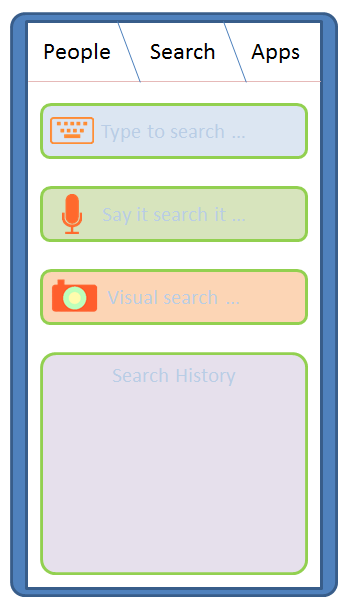
Taking cue from this, and observing how I use my mobile device, I think there are three most important things I do with a mobile device: Keep in touch with people, Search for information and use Applications.

So let me introduce to you : Kosh (Sanskrit: a collection / repository)
It is a collection of things I do:
  • People Kosh : The collection of all tools allowing one to connect to people. The Kosh UI is always accessible from anywhere (if using a full screen application), by using a Swipe down gesture. People Kosh needs only three main components: Phone (which includes VOIP / video calls), Message (which includes SMS and Email) and Social updates (a quick way to be in touch with people on your social networks). The Phone and Message Apps are also 'live tiles'. Unlike Windows Phone 7, they will display additional information, such as from whom you missed the last call, last line from the text message you received recently etc.
metro-phone
  • Search Kosh: The collection of all search tools. This will be central place to search anything (well probably some things in life are still better searched on your own ;) ) : either on the phone, or the Internet. The search can be either text based [input: on-screen keyboard], voice based [input: microphone, audio file] (this will not be just voice recognition, but should be localized, and probably should integrate music search, radio search etc.) and visual [image, camera] (scan image, photo, QR code, bar code and probably video clip).
  • Apps Kosh: The collection of all apps. Device status like remaining battery, Network connectivity are just another apps. One need not have integrated UI for the same. Each icon acts as a means to launch the application. By default the icons are alphabetically organized (as grid of or as a list). Application icons may display notifications. Notifications can be in the form of text or image or a combination of the two, and are displayed alternatively or along with the default icon. Icons with notifications automatically move up and have a glow surrounding them. Once the user taps the apps with notification to open, the icons are automatically placed in their usual location.
    To switch between Apps, use three finger pinch. This will show a list of 'active apps' with end of the list being signified by a shadow on the edge. An active app is not the same as a background app : in fact, on a constrained device it would not be really a good idea. An active app here, is the one that has registered to the system for a background notification. Alternatively the only app that is available 'in memory' is the foreground application. The applications that require background processing (play music, for instance) will be handled by a system process instead.

The Architecture
Well, I want to build the full stack. That is because whatever is currently available is probably not going to work for me. It is not only important to get the kernel done right, but also the rest of the components done well to make for a great user experience (UE). The diagram below shows the most important components of this stack.


The Kosh system will be build on a mirco-kernel architecture. This would mean the Linux (or Android / Palm OS ) kernel would not be a good starting point. A QNX like kernel would be the way to go. The other components are the telephony and network layer, specifically for handling the communication needs. The system process for notification and other management purposes. The Kosh API layer for providing APIs for the UI layer as well as writing third party applications.


The Kosh API layer will have the above major components. I think for all that I outlined about, these set of broad APIs would be just enogh to start with. The UI layer will be build using these APIs and a WebKit based (or WebKit like) rendering engine. This essentially means all user interface layer will be build on HTML 5+ and JavaScript. Consequently, the Kosh APIs will be exposed as JavaScript. Also all the third party apps will be written using HTML and JavaScript. This is a philosophy quite akin to webOS. Essentially this means that EnyoJS might be a good starting point for looking at API design. Another project to look at is Mozzila B2G, the  Boot to Gecko initiative.

A carrier independent network
We are over reliant on the 'carrier network' for all the communication today. Though 'carrier networks' will not disappear overnight, it would be good to have a way of communication that does not rely on a centralizer carrier.That would allow for a medium of communication which is not overlay regulated. For emergency needs though, a carrier or satellite based solution is still required. Irrespective of this, for me, communication among humans should ideally be free, that is what takes the race ahead. At the moment though this is not exactly the case. There is the Internet, that was supposed to be a free medium, but due to one component: the DNS, it could be unfairly controlled. TCP does allow peer-to-peer communication, with no centralized control, but again for people to 'find' each other, we need a kind of directory service. Skype for instance uses peer-to-peer communication, but requires a central authenticating authority. A few years ago, Nokia, experimented with peer-to-peer, proximity communication, using an application called Sensor. The Sensor application (still available for old Symbian), used the Bluetooth as a means of communicating with people in proximity (instead of directly talking to each other!). The Sensor app would host a mobile page of you (like your facebook page), people could see this from their apps and if they like, send message to you, and probably become friends. Sounded like a pretty good idea, but somehow did not catchup, and the project seems to be abandoned altogether, at least for now.


I think, at least for local communication needs, one can setup a peer-to-peer communication system that is independent of any infrastructure. Every device in this system behaves as a carrier. Consider that everyone owns such a device. Also, in a modern city, I think it would be safe to assume that every person will find at least another person with in 10 meters radius (this is just a hypothesis right now, a proof for this would be amazing). All the devices in this system will have a unique number, and will be owned by a person. Every device will have a public and private key for the purpose of security. Now consider that a person wants to send a message to his mate. The way this would work out is as follows:
  • The sender knows the public key and the device identifier of the receiver. For this to happen, both the sender and receiver should have met physically and exchanged this information once.
  • A message packet is prepared with the device identifier, and the content encrypted using public key.
  • In addition, the message packet will contain a field for signifying the importance along with a hop counter. At the source, the importance field will have the highest value, while the hop counter will be zero. Every second hop a packet makes the importance is decremented by one, where as the hop counter is incremented with each hop.
  • The message is then broadcasted to all the nearby (say with in 10 meters radius) devices.
  • If any of these devices is the intended device, the process completes. There still might be lingering packets in the network carrying the original message, these will eventually die as their importance decreases.
  • If the importance field of the message packet reaches a negative value, it is not re-broadcasted, else it is re-broadcasted.
The above is quite akin to the way messages were transmitted in olden days (that were not from Kings). I think this should work wonderfully if the density of the device is sufficient, though at this point I don't have a proof of what this sufficient number should be.
One drawback of this system is power requirement. I am not sure a device that would handle this amount of traffic can last for long, given today's battery technology: the radio (apart from the display) is a major power guzzler.

Alternative positioning
While the GPS works great where I live, and I am actually pleasantly surprised by the accuracy of Nokia Drive app on my Lumia, there is a need for a cheaper solution that will work even if the satellites are out of visibility. Nokia Lumia and most other modern smartphones supports A-GPS, which augments the satellite positioning with other information such as cellular tower positions, wifi hotspots and the IP address of your device to give pretty accurate positioning information.
Another approach would be to use landmarks as a way of positioning. This would basically involve the use camera and some image processing. The device will store information on the known landmarks and their positions. The stream shot coming from the camera will be mapped on to the available landmarks and approximate position calculated. A system like thing, might not be good for turn-by-turn navigation, but will be useful if your are walking or cycling and you want to roughly know your current location. Again, this is not a substitute for GPS, which also provides altitude information, but then for day-to-day use this might just work out.

Programming Model and On-device programming
Kosh will be using HTML + JavaScript for user level programs. Any hardware level code will be written using pure C.
The most challenging aspect, though is to create an On-device programming environment that is easy to use, but also powerful to take full advantage of the capabilities of the device. In my earlier post on Nokia Lumia, I had mentioned about TouchDevelop from Microsoft Research. This is terrific on-device programming environment and I have not found anything yet that comes even close to this. This is one environment that makes me love the Lumia (to see stuff I am up to using TouchDevelop, visit: https://www.touchdevelop.com/wblh). 
To make Kosh really interesting an on-device programming environment akin to TouchDevelop must be built.


References
[1] http://spillwaybrain.wordpress.com/2011/11/10/why-windows/
[2] http://enyojs.com/
[3] http://www.eink.com/display_products_triton.html
[4] http://www.pixelqi.com/products
[5] http://www.qnx.com/products/neutrino-rtos/index.html
[6] http://www.webkit.org/
[7] Wiki on Nokia Sensor: http://en.wikipedia.org/wiki/Nokia_Sensor
[8] Mozilla Mobile web OS: https://wiki.mozilla.org/B2G

Followup
At this point, I only have idea. Not a single line of code to show. But to start it up, I had to write this down. This is just a beginning of the things to come, and hopefully you will love it too :)

Fine Print
The ideas, text and graphics in this post are exclusively created and owned by the author. The templates for few icons in the post are taken from a Google image search, they were then suitably modified for my needs. All the above content, and any followup posts with the label "kosh" is henceforth made available under Creative Commons License (http://creativecommons.org/licenses/by/3.0/) and may be attributed as : Kosh, by V. Ganesh.
The text also contains references to product names, and are trademarks of respective organizations. They are used in the text for information purpose only.

Saturday, October 22, 2011

Insanely helpful error message


Ofcourse, I don't see any harmony in the exception thrown !! ;)

(PS. Nokia, eagerly waiting to know when the WP7 devices are heading to India?)
(Update: So looks like, mostly probably Nokia WP7 is landing in India by the end of the year, ref: http://windowsteamblog.com/windows_phone/b/windowsphone/archive/2011/10/26/nokia-s-first-two-windows-phones-are-here-and-they-re-awesome.aspx. And in most probablity, I am gonna switch to one of the Lumia devices :) )

Wednesday, June 01, 2011

From Symbian to Android

About few months ago I switched from using Symbian to Android. The transition is still in progress, but I can say this much: probably I would never go back to Symbian. And well, Symbian is more or less dead with the Nokia announcement that they would rather be shifting to Windows Phone OS.

As much as this is about moving from one mobile OS to another, it is also about moving from one handset to another. The Symbian phone is a Nokia E51 while the Android phone is a Samsung Galaxy 5.

These are just notes on what I find good and not so good with the switch.

Daily Usage:
My basic requirement from a Phone call is just that it makes and receives phone calls. For this both Android and Symbian seem just OK.

Another requirement from my phone is calender management. In this case Android just wins, mostly because of its seamless integration with Google calender.

Finally battery life: My Symbian phone used to last much longer on a charge than my Android phone. Generally, I feel Symbian is still better in power management. But this may also vary depending on the phone model.

Always Connected:

With Symbian phone I never felt like being always connected. Simply because there were no great apps that needed online update, like no good chat clients.

System stability:

As far as I can say, Android on my phone has not really be stable. With Symbian, my phone worked with a reboot for months ... this has reduced to a few days! This in no way is an advancement. I should really checkout iOS and Windows Phone OS stability to see how other modern OSes fair.

Usability:

I generally find Android to be much more easy to use and navigate than Symbian. Making phone calls, browsing Internet, accessing e-mail, playing music, watching YouTube is all much more enjoying and smoother experience with the Android interface than it has ever been with any version of Symbian.

Did I program?

Not much. Basically, didn't get much time to play around with Android programming as yet. But I did easily manage to port some of the core parts of MeTA Studio project. This initial port is available at: http://cid-76d41f4618b0b6af.office.live.com/self.aspx/metastudio/MeTADroid.tar.gz
May be somewhere down the lane there will be UI Android port for MeTA Studio.

That said, programming on Android is definitely much more enjoying than Symbian C++. I am not sure about the new Qt support for Symbian. But then I always find it enjoying to program in Java than with C++ (i dislike hunting for segfaults in someone elses code ;)).

Monday, April 04, 2011

Configure WiFi usb adapter as a WiFi hotspot (Windows 7)

Had allocated this long weekend for fixing Issue 46 in MeTA Studio, but ended with lot other bugs that had to be fixed. Eventually, I am only half way through fixing the real issue. With all this I got painfully bored :( So decided to do some changes in my setup.

I have a mobile data plan currently on my mobile for which pay about 100 INR per-month for 2GB, which are hardly used up. In fact, I find that I really do not require that. Also, after seeing the new 3G data plan rates (http://airtel.in/Airtel-3G/tariffs.html), I though it was high time I just dump the subscription. So now my phone is quite simply put, un-plugged, with only voice and sms, and pay as you use data.

Now when I am at home, on most of the weekdays, my parents watch TV. And my main desktop as well as the TV is same unit. So, if I need to work (with internet connection), I simply used to setup an ad-hoc connection using a WiFi usb adapter connected to my desktop. The sad part was that my Android 2.1 phone never saw this ad-hoc network. I could simply purchase a Wifi router, but just can't convince myself to get a new device.

After a bit of googling, I came across this very useful article: http://www.blogsdna.com/5506/how-to-setup-virtual-wifi-in-windows-7-without-any-extra-software.htm

Essentially, the whole thing boils down to two commands:

netsh wlan set hostednetwork mode=allow ssid=mywifi key=mypassword
netsh wlan start hostednetwork


and also enabling Internet connection sharing in Windows 7.

Next up, I wanted this to startup automatically when my main desktop booted. I did this by writing the above commands in a batch file and using NSSM - the Non-Sucking Service Manager (http://iain.cx/src/nssm/) to create a Windows auto start service.

Cool afternoon, now back to fixing Issue #46 ;)

Saturday, February 05, 2011

Android finally has official blogger client

So Google has finally released a blogger client for Android. I have been waiting for this for quite some time and was pleasantly surprised to see that in market.

The other pleasant stuff was that Google Goggles is now available for my phone which is pretty cool. Now the only stuff missing is proper offline Google docs support.

Now hopefully I get some time to develop on Android :-)

Friday, January 07, 2011

Motorola Atrix: super phone with a promise

In a recent post, I had argued for a super phone Software interface that:
"Ideally I would like my smartphone OS to automatically scale its user interface form small portable screen to a large desktop scale screen, handle touch, pen and pointing as well as keyboard, seamlessly. That will make computing on the go painless and computing on desk seamless. You will always need only one device: your personal super phone."

With the release of Atrix, Motorola seems to be heading in exactly this direction. Probably a way to acheive this on a phone is via virtualization. That, I guess is how   Motorola is implementing it. With the ever improving ARM SoC capabilities and recent announcement of Windows for ARM, we are soon approaching:

"Three screens, One brain and the Cloud"

mantra. One who gets this right will define the next revolution in computing technologies.

Wednesday, November 03, 2010

Droided

Just a test post from my android phone. Essentially meaning I jumped platform boat from symbian.

The phone is Samsung Galaxy 5, and is probably the cheapest and most feature rich android phone available in India. And turns out that it is even cheaper and more useful than my 3 year old nokia e51. Except that there is no skype on this phone... Yet.

Update: And Skype just released an update for Android (http://www.skype.com/intl/en-us/get-skype/on-your-mobile/skype-mobile/android/), which works great on my phone (audio only at the moment) :)

Location : Atmanand Park, Clover Park, Viman Nagar, Pune, Maharashtra,

Monday, November 12, 2007

Who "learns" APIs anyway?

This is a sort of after thought and comment on my previous post where I "complained" about learning a new API.

Most of my experience with Java has been not in developing application but rather designing APIs and programming platform (for instance MeTA Studio http://code.google.com/p/metastudio/). Where as, whenever I had used other languages (C, C++, Fortran, Python...) it was mostly for application development. Developing good and usable APIs do require fair amount of thinking and design tactics to be put in. Developing pure application on the other hand is, many a times more faster and easier job. A good API need not be "learned", rather it is apparent form it as to what you can do with it. You do not "learn" a good API, rather you cleverly "use" them to build applications.

In that sense probably Android APIs are "pretty good".

Android is out: But am a bit disappointed.

This is a follow up on my earlier article "speculating on Android". Google has finally released the SDK for Android platform and with a first look at the APIs I am not too happy. Not because my main assumption of inclusion of a scripting interface went entirely for a toss, but because Android has a whole new set of Java libraries (APIs) rather than adopting a standard set of Java APIs. Another claim was that development on Android platform would be easy and fast. But with my experience of using Java from mobile to desktop to server has it that a very strong design and object orientation skills have to go in to develop flexible and robust applications. When you have a "good enough" and many times an evolving design it is not really RAD. RAD is what is been offered by initiatives like, pys60 (python on Nokia S60 phones).

After a bit of pondering over the APIs it does some how feel that many of those are needed but are in no way available in Standard Java libraries. One of such aspects is the touch APIs (http://code.google.com/android/samples/ApiDemos/src/com/google/android/samples/graphics/TouchPaint.html).

But here again I fail to understand as to why the standard Java graphics libraries are not used and instead Android's own libraries are used. This to me feels like introducing more confusion than "helping " the people who develop on Java platform. In essence, I simply do not understand the necessity of learning completely new set of APIs for programming on Android and that too in a "write once and run every where" language.

Friday, November 09, 2007

Speculating on Android Platform

Google and a group of 34 other companies announced the Open Handheld alliance this week (http://www.openembedded.org/). They also announced that a SDK for the "open" platform named Android would be made public on Nov 12,2007. I am just trying to speculate what all this platform might constitute:

1. An embedded Linux kernel, probably built and hardened by Google engineers.

2. A scripting language like Python as an interface for programming. other scripting language that would be included is JavaScript. To Some extent this would be like PyS60 (Nokia's Python implementation for S60 phones - http://wiki.opensource.nokia.com/projects/PyS60), however I feel that this will be the primary mechanism of programming on Android platform. I am not sure it they would provide any native programming support; primarily because of two reasons : cross compiling is difficult and time consuming secondly native code is always a security risk.

3. Large set of APIs for supporting Web 2.0 applications. It will probably support all Google data APIs, however I feel that the platform will it self support integration of other Web 2.0 (or 3.0...) apps. This is what I mean by "open'', and not closed to only Google services.

4. Would have some seamless mechanism to access Internet from all kind of networks supported by the device. This is mostly a hardware feature, but felt like mentioning it.

So these are my speculations! Let us see, what Google and its alliance have out of their hats next week. Turn back to this space to see how poorly I faired ;)


(update: Just forgot to mention in point 2 that Java and JavaFX are also strong contenders here, but with Sun Microsystems currently not officially part of the consortium I wonder whether this is really the central part of the platform).