I have been a smartphone user ever since I went mobile, my first phone being a Symbian Phone. Since then I have, on daily basis used newer version of Symbian, Android (up till Gingerbread), and now I am loving the beauty and elegance of Windows Phone 7 (Mango) on my Lumia 800. Intermittently, I have also dabbled with iOS and Bada. None, however come close to the usability that Windows Phone currently provides. For those of you, who still don't 'get' the Metro UI, this post might enlighten a bit:
http://spillwaybrain.wordpress.com/2011/11/10/why-windows/
My primary requirement from a Smartphone has been programmability, preferably on the phone itself. With Symbian, I really enjoyed the pys60 (
http://sites.google.com/site/tovganesh/s60) and now with Windows Phone, I am having fun with TouchDevelop (
https://www.touchdevelop.com/wblh), more on this in subsequent posts. With Android though, I just couldn’t get connected the same way.
While Windows Phone is a great OS, the current price point makes it unaffordable to large section of people. This may change over time, particularly in combination with Nokia. On the other hand, Samsung, with its Bada OS, plans to build a ‘smartphone for everyone’. However, with the current programming model for Bada, particularly the use of C++; doesn’t really go well with the philosophy. Because, to me a smartphone should not only be programmable by a professional third party, but also as easily by the owner of the device; just as is the case with the PC. When you have this joy of programming your own device, you kind of connect to the device for a long attachment, not just for period of your current contract (anyone remembers the BBC Micro?).
The Phone
Most smartphone designs today seem to forget that it is actually a phone. So making a phone call on a smartphone is typically much slower than on a very basic Nokia device. You can't just start keying in the number to give a call. You have to open the Phone App and then give a call. And in some designs you even have to press one extra button to bring up the dialer app! Oops that is a complicated phone, but we still like to call it smartphone, for some reason.
So the smartness comes from the fact that it is able to do a whole lot of other things than just being a phone, not that it is easier to make a phone call from it. It serves as a communication hub. It basically tries to provide a complete mobile computing experience in your pocket. Over time, probably we will use the phone component in it a lot lesser, and then it would be more technical to call it a
smartmobile.
Another drawback of most smartphones today is the battery life: it is simply unacceptable. Though my current Nokia Lumia 800 easily lasts for a day and half of normal usage (always on data, few calls and text messages, occasional games, about half hour of GPS usage - for sports tracker), for it to be usable by a large majority of people in a nation like India, it needs to run on solar power or an alternate form of energy (body energy, crank shaft, anybody?). Currently, though I can see Solar energy as the only viable solution. This could be coupled with a crank shaft enabled charger, though my experience with a crank shaft device (Philips radio), has not been that great : probably it had a design flaw. For most of the mobile devices today, the display is one of the components that consumes the maximum amount of power. Without the display these devices could go on easily for more than a week. Take for instance the Kindle, it can easily go for about 10 or more days, even with the 3G radio on; with the radio off it lasts for more than a month. The one major difference is the screen: e-ink. Although the e-ink looks fine for a book reader, for a mobile device it will not work out. Options would be to use color e-ink or PixelQi screen. The recent demonstration by the OLPC project [
http://www.youtube.com/watch?v=ITHNbOrPQyM] shows some hope, but a lot of work needs to be done to make it to a device that can be held in your hands.
To design the right hardware would be a challenge. At this moment I am not very clear about what this hardware would be, so I will use followup posts to put in my thoughts on the hardware side.
The UI
So, I want a smartmobile, whose primary functions is to stay connected with the people you care about: friends, family and co-workers. The Metro UI, which I pretty much like, tries to do this with what is called as a People's Hub. This is a well though out piece of UI, which threads all your contacts, communication into a single place. This also connects to the social media, and brings up the latest updates of your friends.
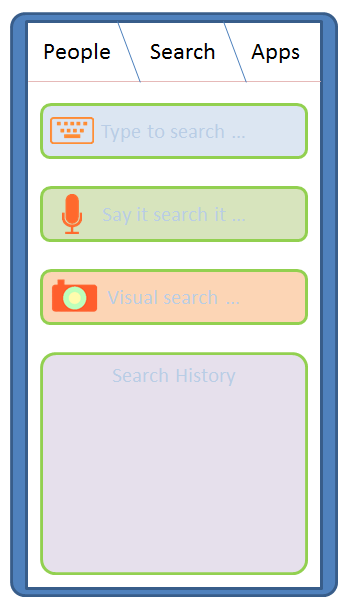
Taking cue from this, and observing how I use my mobile device, I think there are three most important things I do with a mobile device: Keep in touch with people, Search for information and use Applications.
So let me introduce to you :
Kosh (Sanskrit: a collection / repository)
It is a collection of things I do:
- People Kosh : The collection of all tools allowing one to connect to people. The Kosh UI is always accessible from anywhere (if using a full screen application), by using a Swipe down gesture. People Kosh needs only three main components: Phone (which includes VOIP / video calls), Message (which includes SMS and Email) and Social updates (a quick way to be in touch with people on your social networks). The Phone and Message Apps are also 'live tiles'. Unlike Windows Phone 7, they will display additional information, such as from whom you missed the last call, last line from the text message you received recently etc.


- Search Kosh: The collection of all search tools. This will be central place to search anything (well probably some things in life are still better searched on your own ;) ) : either on the phone, or the Internet. The search can be either text based [input: on-screen keyboard], voice based [input: microphone, audio file] (this will not be just voice recognition, but should be localized, and probably should integrate music search, radio search etc.) and visual [image, camera] (scan image, photo, QR code, bar code and probably video clip).

- Apps Kosh: The collection of all apps. Device status like remaining battery, Network connectivity are just another apps. One need not have integrated UI for the same. Each icon acts as a means to launch the application. By default the icons are alphabetically organized (as grid of or as a list). Application icons may display notifications. Notifications can be in the form of text or image or a combination of the two, and are displayed alternatively or along with the default icon. Icons with notifications automatically move up and have a glow surrounding them. Once the user taps the apps with notification to open, the icons are automatically placed in their usual location.
To switch between Apps, use three finger pinch. This will show a list of 'active apps' with end of the list being signified by a shadow on the edge. An active app is not the same as a background app : in fact, on a constrained device it would not be really a good idea. An active app here, is the one that has registered to the system for a background notification. Alternatively the only app that is available 'in memory' is the foreground application. The applications that require background processing (play music, for instance) will be handled by a system process instead.

The Architecture
Well, I want to build the full stack. That is because whatever is currently available is probably not going to work for me. It is not only important to get the kernel done right, but also the rest of the components done well to make for a great user experience (UE). The diagram below shows the most important components of this stack.
The Kosh system will be build on a mirco-kernel architecture. This would mean the Linux (or Android / Palm OS ) kernel would not be a good starting point. A QNX like kernel would be the way to go. The other components are the telephony and network layer, specifically for handling the communication needs. The system process for notification and other management purposes. The Kosh API layer for providing APIs for the UI layer as well as writing third party applications.

The Kosh API layer will have the above major components. I think for all that I outlined about, these set of broad APIs would be just enogh to start with. The UI layer will be build using these APIs and a WebKit based (or WebKit like) rendering engine. This essentially means all user interface layer will be build on HTML 5+ and JavaScript. Consequently, the Kosh APIs will be exposed as JavaScript. Also all the third party apps will be written using HTML and JavaScript. This is a philosophy quite akin to webOS. Essentially this means that EnyoJS might be a good starting point for looking at API design. Another project to look at is Mozzila B2G, the Boot to Gecko initiative.
A carrier independent network
We are over reliant on the 'carrier network' for all the communication today. Though 'carrier networks' will not disappear overnight, it would be good to have a way of communication that does not rely on a centralizer carrier.That would allow for a medium of communication which is not overlay regulated. For emergency needs though, a carrier or satellite based solution is still required. Irrespective of this, for me, communication among humans should ideally be free, that is what takes the race ahead. At the moment though this is not exactly the case. There is the Internet, that was supposed to be a free medium, but due to one component: the DNS, it could be unfairly controlled. TCP does allow peer-to-peer communication, with no centralized control, but again for people to 'find' each other, we need a kind of directory service. Skype for instance uses peer-to-peer communication, but requires a central authenticating authority. A few years ago, Nokia, experimented with peer-to-peer, proximity communication, using an application called Sensor. The Sensor application (still available for old Symbian), used the Bluetooth as a means of communicating with people in proximity (instead of directly talking to each other!). The Sensor app would host a mobile page of you (like your facebook page), people could see this from their apps and if they like, send message to you, and probably become friends. Sounded like a pretty good idea, but somehow did not catchup, and the project seems to be abandoned altogether, at least for now.

I think, at least for local communication needs, one can setup a peer-to-peer communication system that is independent of any infrastructure. Every device in this system behaves as a carrier. Consider that everyone owns such a device. Also, in a modern city, I think it would be safe to assume that every person will find at least another person with in 10 meters radius (this is just a hypothesis right now, a proof for this would be amazing). All the devices in this system will have a unique number, and will be owned by a person. Every device will have a public and private key for the purpose of security. Now consider that a person wants to send a message to his mate. The way this would work out is as follows:
- The sender knows the public key and the device identifier of the receiver. For this to happen, both the sender and receiver should have met physically and exchanged this information once.
- A message packet is prepared with the device identifier, and the content encrypted using public key.
- In addition, the message packet will contain a field for signifying the importance along with a hop counter. At the source, the importance field will have the highest value, while the hop counter will be zero. Every second hop a packet makes the importance is decremented by one, where as the hop counter is incremented with each hop.
- The message is then broadcasted to all the nearby (say with in 10 meters radius) devices.
- If any of these devices is the intended device, the process completes. There still might be lingering packets in the network carrying the original message, these will eventually die as their importance decreases.
- If the importance field of the message packet reaches a negative value, it is not re-broadcasted, else it is re-broadcasted.
The above is quite akin to the way messages were transmitted in olden days (that were not from Kings). I think this should work wonderfully if the density of the device is sufficient, though at this point I don't have a proof of what this sufficient number should be.
One drawback of this system is power requirement. I am not sure a device that would handle this amount of traffic can last for long, given today's battery technology: the radio (apart from the display) is a major power guzzler.
Alternative positioning
While the GPS works great where I live, and I am actually pleasantly surprised by the accuracy of Nokia Drive app on my Lumia, there is a need for a cheaper solution that will work even if the satellites are out of visibility. Nokia Lumia and most other modern smartphones supports A-GPS, which augments the satellite positioning with other information such as cellular tower positions, wifi hotspots and the IP address of your device to give pretty accurate positioning information.
Another approach would be to use landmarks as a way of positioning. This would basically involve the use camera and some image processing. The device will store information on the known landmarks and their positions. The stream shot coming from the camera will be mapped on to the available landmarks and approximate position calculated. A system like thing, might not be good for turn-by-turn navigation, but will be useful if your are walking or cycling and you want to roughly know your current location. Again, this is not a substitute for GPS, which also provides altitude information, but then for day-to-day use this might just work out.
Programming Model and On-device programming
Kosh will be using HTML + JavaScript for user level programs. Any hardware level code will be written using pure C.
The most challenging aspect, though is to create an On-device programming environment that is easy to use, but also powerful to take full advantage of the capabilities of the device. In my earlier post on Nokia Lumia, I had mentioned about TouchDevelop from Microsoft Research. This is terrific on-device programming environment and I have not found anything yet that comes even close to this. This is one environment that makes me love the Lumia (to see stuff I am up to using TouchDevelop, visit:
https://www.touchdevelop.com/wblh).
To make Kosh really interesting an on-device programming environment akin to TouchDevelop must be built.
References
[1]
http://spillwaybrain.wordpress.com/2011/11/10/why-windows/
[2]
http://enyojs.com/
[3]
http://www.eink.com/display_products_triton.html
[4]
http://www.pixelqi.com/products
[5]
http://www.qnx.com/products/neutrino-rtos/index.html
[6]
http://www.webkit.org/
[7] Wiki on Nokia Sensor:
http://en.wikipedia.org/wiki/Nokia_Sensor
[8] Mozilla Mobile web OS:
https://wiki.mozilla.org/B2G
Followup
At this point, I only have idea. Not a single line of code to show. But to start it up, I had to write this down. This is just a beginning of the things to come, and hopefully you will love it too :)
Fine Print
The ideas, text and graphics in this post are exclusively created and owned by the author. The templates for few icons in the post are taken from a Google image search, they were then suitably modified for my needs. All the above content, and any followup posts with the label "
kosh" is henceforth made available under Creative Commons License (
http://creativecommons.org/licenses/by/3.0/) and may be attributed as : Kosh, by V. Ganesh.
The text also contains references to product names, and are trademarks of respective organizations. They are used in the text for information purpose only.