Thursday, October 10, 2013

Notes on "sorting a hash table" in Python

Well, by definition you can not sort a hash table as "order" is not really important in that data structure. However, there are situations where data stored in a hashtable needs to be displayed in some ordered fashion. In such a case you can obtain a "sorted representation" of the hash table.
For instance, I had the following hashtable, which I wanted to display as tabular data:

td = {1: {"mykey1":[4,5,6, -2, 5, 6,7], "mykey2":[6,7,8]}, 2: {"mykey1":[5,7,8,9], "mykey2":[0, 9, 7, 6, 8]}, 3:{"mykey1":[5,7,8,9], "mykey2":[0, 9, 7, 6, 8,9]}}

My intention is to display:


  mykey1 mykey2
1 7 3
3 4 6
2 4 5

Essentially, the data is displayed based on the number of items in mykey1 and then sorted on mykey2. You could write code to flatten the hashtable, but you can write this more elegantly as follows:

def hashCountSort(h, k, r=False):

    def len_cmp(x, y):
      ln = 0
      for ck in k:
          ln = (len(x[1][ck]) - len(y[1][ck]))
          if (ln != 0): return ln
      return ln

    return sorted(h.iteritems(), cmp=len_cmp, reverse=r)

And use:
print hashCountSort(td, ["mykey1", "mykey2"], True)

Above, I use nested function in Python (essentially a closure) to define a len_cmp function, that iterates through a list of keys. Forward key comparisons are only made if the earlier key compare returned an equality. Also note that the iteritems() converts individual key, value pairs of the outer hashtable to an iteratable tuple list, with each tuple containing (key, value) items.

More generally one may write:

def hashSort(h, k, cmpf, r=False):

    def hash_cmp(x, y):
      res = 0
      for ck in k:
          res = cmpf(x[1][ck], y[1][ck])
          if (res != 0): return res
      return res

    return sorted(h.iteritems(), cmp=hash_cmp, reverse=r)

And use:
def cmp(x, y):
   return (len(x) - len(y))

print hashSort(td, ["mykey1", "mykey2"], cmp, True)

In the above example, I am using an external user provided function that may be defined by the user indicating how exactly the comparison function should be made for the purpose of sorting. One should note that the cost of such functions is high, and one may need to optimize if you have very large dataset.

Hope someone finds this useful ;)
Have a great weekend!

Saturday, September 07, 2013

Microsoft buying Nokia, is a bit emotional


My Nokia Lumia 800. Never going to sell it.
 
 
I love Nokia, the brand, the company and the people there that make such great devices. I love Windows Phone for a fresh new perspective on the mobile UI design. But now Nokia being brought by Microsoft is not exactly what I would have wanted, though business wise it makes absolute sense.

Sigh. 

Irrespective of what would be my next phone (if any), my current phone (the iconic Nokia Lumia 800) is going to be preserved with me, till I am in this physical world. So much for brand loyalty, I think is okay ;)


Sunday, September 01, 2013

It is not calls, text and tweet that would make a smartwatch


When I was a kid, I loved wearing watches. My initial fancy was with digital watches. Then I liked the analog quartz watches. Once I got my first smartphone (the Nokia 6600), I stopped using a wristwatch altogether. I still rarely wear a Casio battery less solar watch, when going for a long outing. But I almost always never seem to like wearing anything on my wrist.

Most of the times I find the functionality offered by my wristwatch redundant. Well my current Casio does only the following: Show time, Show data, has stop watch, and I can setup an alarm. All of this I can do it on my smartphone in a much more intuitive way. The only incredibly important thing that my watch offers over a smartphone is the virtually lifelong, never ending battery, oh well it doesn't have one, it uses a supercapacitor instead.

So with all the media interest on the "upcoming smartwatches", it made me think: What exactly can a smartwatch do better than a smartphone?

It can not be calls, text and tweets
I don't see at all how a smartwatch would be more useful by merely offering what a phone already does good: calls, text and tweets. Moreover, I don't think that it is really useful or adds value as a device on its own. The reason why smartphone replaces a PC for most of the tasks is that it incredibly easy to text, call or tweet, or for that matter check email on a smartphone than on a PC. A smartphone can do this with a reasonable screen estate and with some very smart on screen keypads for entering text. This may not work out as much on a smartwatch. An alternative would be to use voice commands, but it would look funny yelling into my watch ... mistaken for characters in Captain Vyom or Space Age Sigma TV serials ;)

Sure you can link up a Bluetooth headset, but then you are wanting to keep two things charged using the battery. That doesn't make it smart, and no you can't yet power this on body heat. I would instead just pick that smartphone from my pocket and speak or text in a much more convenient way.

And so it can not be something like play music, watch YouTube or vine clips, or post Instagram photos. That does not click. Further, I think any of the above is not important when I am on move.

What would be unique applications on the smartwatch?
To me a smartwatch should offer all of the following to be useful:
  • Super light construction, super good battery life. May be some kind of solar charging could be good, but highly unlikely with the current tech. It should ideally be water proof, but water resistance would do.
  • It should display time, date and any upcoming calendar appointment on the home screen (and nothing else)
  • The calendar app (or should I call it waap? - short for watch application ;-) ) should be location aware. I should be able to add location based reminders to the calendar, may be controlled via my paired smartphone.
  • The sensors that watch should have: GPS, Magnetometer, Gyroscope, Body and Atmospheric temperature reader, Pedometer (or a software solution based on GPS), Heart beat monitor, dedicated bar code / QR code scanner, it also needs to be always connected .. to the Internet and probably have a NFC radio.
  • Must have wapps (first party / third party via watch SDK): Weather app (local aware), Health app (body temperature, heart beat rate synced with cloud / smartphone), Voice recorder, Alarm app, Compass App, Show my location, Near by app (like Nokia City Lens), Transit app (like Nokia transit app - controlled by the accompanying smartphone), Travel app (get me a taxi - Uber style, flight status, train ticket status), Apple's Siri like assistant
  • SDK offering ways to extend watch functionality: barcode/QR code scanner for price comparison apps, QR code scanner for contact transfers / sharing, calendar and location based advertising - say 'buy milk' is one of the reminders, the watch will beep you when you are near a supermarket, and indicate the price of it in adjoining shops too... limitless possibilities

So what are 3 things from above that are most important?
  • Super light construction, super good battery life
  • display time, date and any upcoming calendar appointment on the home screen
  • Weather app, Health app, Voice recorder, Compass App, Show my location, Near by app, Transit app
No, I can't cut down further, I would rather (not) use my current watch instead.

The interface part is tricky.
Most of the so called "mockups" I have seen so far (or the UI available on current 'mobile watches') is just dumbed down, scaled down version of a smartphone UI. That simply is not going to work. Some people may claim that Windows Phone UI (the modern / metro UI), would be great on the smartwatch too. But I don't think that is going to work either. Although a refined form of Windows Phone UI may actually work. Here is my 30 minute powerpoint mockup :)

A mockup of smartwatch UI that I would like to see.


Of course to realize this into hardware and software is a task in itself, probably not possible as a single entity.

In any case, Samsung is going to show its smartwatch next week, let us see what they have. And Apple has been rumored long to be developing one, I hope that they have some of the things I mentioned in the post. But I would be quite thrilled if Microsoft and Nokia come up with some elegant solution as well. I would consider myself rather lucky if I get a chance to work with one of the teams doing this work though :)

(Update Mar, 2014: Samsung has indeed released multiple "smart watches", but none of them are actually up to mark, and doesn't seem to solve any real issues)

Sunday, August 11, 2013

Trying my SLR attachment lenses with Lumia 800

About an year ago I had purchased a set of attachment lenses for my Canon 1000D from EBay. These were kind of very cheap replacement for doing some extreme macro shots, as the actual macro lenses from Canon were way too expensive and I simply could not afford to buy them. The cheap replacements turned out to be ok (see one such shot of pollens here http://www.flickr.com/photos/tovganesh/sets/72157628049776643/). But over time I realized that the color reproduction was poor in low light, more over the field of view was extremely narrow. Further, it was quite a task to screw these attachments to the lens only to discover that the subjects have moved away.
 
So when couple of snails visited to my backyard today, I decided to experiment a bit. And today being a bit sunny day helped. Here are some of the shots taken on my Canon 1000D.


Shots of 'mother' snail. Top one via normal lens, bottom one using additional attachment lens. Both shot using my Canon 1000D.


The 'baby' snail. Shot using additional lens attachment on Canon 1000D.


'mother' snail, shot using normal lens of Canon 1000D.
 
Now snails are very interesting creatures to watch when the crawl by, and my dad wanted me to record a video. My Canon 1000D, though pretty good at photography, doesn't have video recording. This is where my Lumia 800 chips in, which can take pretty good 720p videos. Initial shot was pretty ok. But then it clicked: how about just placing the SLR attachment lenses on top of the Lumia, hold it by hand and shoot?


Simple placement of SLR attachment lenses on Lumia 800, and just hold the lens while shooting.
 
 
Surprisingly, it worked out pretty nice. See the video below to get an idea of the additional zoom offered.


So it turned out to be my "jugaad zoom" for my Lumia 800 ;) I will experiment more with "jugaad zoom" till I can get hold of Lumia 1020 or a higher version of that :P
 
In any case, now I will more often than not be using these lens attachments.


Saturday, August 10, 2013

Linux on my Netbook

Back to Linux and the GMA 500 driver problem
 
When Windows 8 came out, I was happy to test out and upgrade the Windows 7 installation on my Asus T91MT. It was OK in the beginning, but the GMA 500 drivers were unsupported on Windows 8. This showed up in day-to-day use. IE used to frequently crash, and the display went black for umpteen number of times when I was doing something important. This was fine in the beginning, but even after many updates to Windows 8 this problem never got resolved. Finally, I discovered that Intel has stopped further development of GMA 500 drivers, and the Windows 7 drivers would be the last one out.
 
With that, I though that it is good time to revisit Linux. This was not the first time I tried Linux on T91. I had done this before, but the state of GMA 500 drivers on Linux has been ever worse. There has not been a supported opensource driver for this quite powerful GPU, because of the "closed" nature of the hardware chipset itself. Ubuntu 13.04 (and its other lighter derivatives: Xubuntu and Mint Linux) with the updated Kernel (3.3.x or higher) has drivers written by Alan Cox that give out-of-box descent graphics support for the GPU. Still, the support is far from optimal, and there is no indication that the situation is going to get better. In any case, I decided to install Xubuntu (and then Mint Linux) on T91 about a month ago. This weblog enlists my experience in using Linux on my T91.
(For the aficionados: I refer to Linux and the Linux distributions - Xubuntu or Mint Linux - interchangeably in this post.)

 
Why did I actually switch to Xubuntu from Windows 8?
 
Simple: I am going to buy a new Windows 8 tablet, with newer hardware (read better touch screen, better processor). Not so soon, but eventually will ;)
 
 
The basics: Netbook, can I browse the net?
 
When the Netbooks came out, one of the basic functions they were supposed to do effortlessly was browse the Internet, and along side provide some basic PC functionalities. Looking back, I think, this promise never worked out, and Apple with its iPad showed just how that experience should be. 
 
Xubuntu comes installed with Firefox. It works great, I never had much complains about Firefox, except its UI feels heavy. So the next browser choice was: Chromium.

The browser of my choice: Chromium 

Chromium worked great till someone send me an Youtube, that I quickly wanted to watch .. no Flash plugin in Ubuntu! And I thought Youtube was all HTML 5. But apparently it is not, at least not yet. The biggest let down is that none of the live streams works without Flash. And so I visited Adobe site to install the latest Flash player. And I am informed that Flash is no longer under active development for Linux! What?! Ok I know Flash is kind of dead, but still.

So, I reluctantly switched to Chrome (the browser that I generally avoid). Here, Youtube "works", but it is choppy video, the incomplete GMA 500 drivers shows up its inability to render video here. But there other problems: after doing some investigation I found that XOrg process seems to consume one HT core (the T91 has Atom Z20, that has two HT cores), for apparently no reason. This is either a problem with XOrg, or as result of GMA 500 driver being not able to support some operation (again due to closed source nature!), which are then emulated by the CPU. But all this actually kills the experience of browsing the net on the netbook. At the end of this I still felt as if IE10 with the unsupported GMA 500 on Windows 8 performed far better (not sure how IE 10 fares on Win 7, with official GMA 500 drivers though).


Music: The ogg codec

Ever after the Flash exception, I still didn't want to install any thing that is not opensource. So I though it would be good to convert some of my music files to ogg and use it on my Netbook. I think ogg is a fairly good format to compete with MP3, but compared to MP4 (audio), ogg is far inferior as far as the file sizes go (some times you may get as much as 5-6 times lower file size with mp4-audio as compared to ogg). Due to the state of the GMA 500 driver, I didn't even bother to check how video works.


Office application: Not much

Now a days I hardly use office. Most of my work gets done via Python / R. When I need office, I use my reliable desktop (yes I still use a desktop), which runs on Windows 8.


Occasional Work:

For me this is terminal, vi, Emacs, browser, compiler, and interpreter .. and all are there on Linux!


Overall

One thing: if the GMA 500 drivers were complete, Linux on this machine is just superb (consumes less disk, and offers far more than a vanilla Windows installation). In the end however, I may switch back to Win 7, or try out the new Xubuntu when it is released his October.
 

Sunday, June 02, 2013

Quick Note: MeTA Studio repository has moved to Mercurial

I have moved the MeTA Studio (http://code.google.com/p/metastudio/) repository from SVN to Mercurial (http://code.google.com/p/metastudio/source/browse/). Unfortunately, this change removes a lot of commit statements and history. However, it is good to restart once in a while ;)

Wednesday, May 29, 2013

Using an old android phone as a mobile 3g hotspot: reviving Galaxy 5

 
The Galaxy 5
 
The Samsung Galaxy 5 (http://www.gsmarena.com/samsung_i5500b-3371.php), was one of first reasonably priced Android phones to be released in India. I got this phone to first time experience a full touch phone, tired of endlessly waiting for Nokia to release its N9. This phone came with Android 2.1 (éclair), with some variants getting updated to Froyo. Mine was never updated. Exactly 1 year after I brought this phone, I was quite unhappy with the phone, Android and Samsung and happy switched to Lumia 800 on the launch day (also see: http://tovganesh.blogspot.in/search?q=lumia). Since then I have rooted this phone, have installed numerous builds of CyanogenMod, and once unsuccessfully tried to sell it off. But now finally found a real use of this phone: use it as mobile hotspot.
 
 
Reviving : Cyanogenmod
 
A day after I got my Lumia 800, I rooted my Galaxy 5 to install whatever build was available of CyanogenMod. It was pretty immature and unstable at that time. But it got better and better. psyke83, the main developer has even ported CyanogenMod 10.1 (which is basically Jellybean 4.x) for this device. But for my purpose, I found the CyanogenMod 7 ROM more stable. One thing good with Android, is that I can literally install my own OS once the device has been boot unlocked.
 
The Galaxy 5, with CyanogenMod 7 - http://madteam.co/forum/development-8/(dev)-cyanogenmod-7-2-0-rc1-galaxy5-port/ (or 10.1 - http://madteam.co/forum/development-8/(dev)-cyanogenmod-10-1-galaxy5-port-(androidarmv6)/) from psyke83 et al. is a solid replacement for the stock ROM (which was éclair).

To know about installing the CyanogenMod builds visit the development thread of madteam (http://madteam.co/forum/development-8/)


Using Galaxy 5 as Portable "mi-fi"

I had recently got a 3G data card from Vodafone India for internet access while travelling. Although, after buying this card I realized that my current service provider (Airtel), is also giving me pan-India roaming for data. However, the Airtel connection is a 2G service in my circle so is pretty much not useful when I want to remotely work while travelling. However, the dongle has additional problems: I have to always keep it connected to my laptop; many a times it has signal problem, moving around with laptop makes it quite uncomfortable. After searching for portable 3G routers, I decided to experiment with using my Galaxy 5 as a mobile router instead. The Galaxy 5 is a 3G phone and the CynogenMod ROM provides with options of tethering the data connection. More over the Vodafone data card is a SIM based solution, essentially allowing me to use the SIM in any phone or device, without the data card.

I use the custom power widget to make switching on an off the 3G hotspot easier. I have also installed the MyDataManager app (https://play.google.com/store/apps/details?id=com.mobidia.android.mdm) to give me an idea of how much data is be consumed.


Battery life and Performance

Have used this setup only for 24 hours, and that too at home. So, I can truly comment on this only during my next travel. Having said that, the battery life seems to be pretty descent, lasted for about 12 hours on descent usage. The 3G speeds are also pretty good at the place where I live.


Saturday, March 30, 2013

An old Netbook and living in a browser

My old netbook (Asus T91 MT) is getting old. Though I installed Windows 8 (upgraded from Windows 7), the experience on it far from stellar. My 2007 desktop (which is also upgraded to Windows 8), handles things much better. The Windows 8 experience on this desktop machine is really pleasing. And now with the new Twitter app, I am more often in the new Windows 8 mode than the desktop mode. It is just so better for twitter and internet browsing (with IE10). I occasionally use Firefox for browsing, but dislike Chrome, because of earlier experiences. When I need to do some real work (outside the browser), there is no other option but to go to desktop (which I frequently need when using Word / Excel or programming or connecting to my remote terminal using Putty).

My netbook has pretty low configuration in comparison to my desktop. But the worse part being that due to low screen resolution, the new Windows 8 apps are not supported. Which is not essentially a problem, as the only reason I used my netbook was as a secondary device for Internet (although these days I prefer using my Lumia). But being not able to use the wonderful "metro mode IE10" is a dampener.

So, this weekend I decided to do some experiments: Turn my netbook into doing only one thing, i.e. Web browsing. The first option was to remove all the Windows 8 apps, including uninstalling IE. Well, but before uninstalling IE I downloaded Chrome, and began the experiment with "chromebook" on an old hardware using a Windows kernel (not the default Linux kernel).

The Chrome looks great and integrated finely with the Windows shell, but the hardware tweaks make it unusable on old hardware.

As soon as started using Chrome, I had multiple issues: gtalk didn't work, youtube didn't work. Now I was quite disappointed to see that Google's own product didn't work with its own browser. After searching and tweaking a bit in the advanced settings, I got gtalk working. But youtube had simply too many issues. Then the next issue was basic browsing had a problem: may a times the webpages simply didn't load. I disabled all gpu related acceleration, thinking this would solve things a bit, it did, but still the experiences was far from what I would expect from a great browser (albeit on a dated hardware).

My next experiment was to try the next opensource browser: Firefox. So essentially I made a "Firefox book". Most of the things went of smoothly, until I started writing this post. For some reason the typing speed in Firefox turns out to be pretty bad for my reasonably powered netbook.

Firefox on my Netbook is an 'OK' experience. There are problems: touch events don't work, typing is painfully slow.

Another not so good thing about Firefox is its poor integration with touch events, make it unusable in tablet mode.

So finally I switched back to IE10. And IE10 is simply the best Windows browser on any hardware. It simply works. I don't have to worry about any incompatibility (such as touch events not working) or slow speed, even on my pretty old hardware.

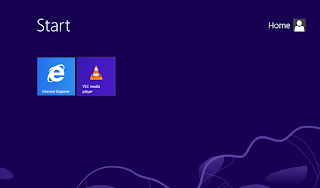
The IEBook: That is what I have got now, with the vlc player for offline videos.


So at the end of this experiment, I have a new product: the IEBook, on a pretty low cost dated hardware, something that I would instead have expected from opensource browser and Linux. Ironical, but I guess the proprietary GMA 500 gpu is the reason for this role reversal. May be someone can try similar experiments on their old 'netbooks', and let me know in the comments section of your experiences. There is one drawback to IEBook though: it doesn't provide as seamless experience with Google services as a Chromebook would.


Sunday, March 03, 2013

Small (and big) inconsistencies with Windows 8 and Windows Phone

I have been using Windows 8 (on my desktop and netbook) and Windows Phone on daily basis as my primary devices for quite some time now. This post is a list of inconsistencies I find with using these interfaces that are supposed to integrate the experience across the screens:

1) Scrolling on home screen: Windows 8 makes it horizontal scrolling where as Windows Phone is vertical scrolling. Why on the earth it is this like this? I have no clue. Windows 8 could have simply adapted the way Windows Phone does the scrolling.

2) Resizing the live tiles: Windows Phone does this right; hold down the live tile and the resize glyph is shown right below the tile. With Windows 8 you have to go down and see that bar (what ever it is called) at the bottom to even know that you can resize the tile. This is particularly inconvenient once you have got used to Windows Phone. Wasn't familiarity with Windows Phone going to make my Windows 8 learning curve easier?

3) Where is the Bing lock screen image option in Windows 8? It is simply the best feature in Windows Phone.

4) Where is the 'Me tile' in Windows 8? Or other way round: Why is the People tile and the Me tile in Windows Phone not integrated (as in Windows 8)?

5) As with Windows 8, why there is no option to switch off live tile in Windows Phone? No, for end user this is not the same as going to settings and switching off the background services.

6) Why can't I set sound profiles on per application basis for Windows Phone as I do with Windows 8?

7) The desktop notifications and the new Windows store application notifications are all messed up and confusing at best. There is a need for unified notification center, which should be also available with Windows Phone.

8) IE10 UI on Windows 8 (new metro version) is much better, especially the way tabs are handled. Why is this not adapted for Windows Phone is quite a mystery.

These are the major concerns that I have on day-to-day basis. There are others (like why can't I create a new Powerpoint using Windows Phone?). But I guess, these are more niche problems. Until Microsoft fixes these issues, probably Ubuntu stands a better chance of bringing the 'one OS multiple screens' strategy to masses.
 

Monday, January 28, 2013

Quad-Core phones are 'in budget', but what about battery life?

Karbonn (an Indian mobile manufacturer), just released a Quad-core phone (http://www.karbonnmobiles.com/karbonn-S1Titanium-proid-118.html) for a price that is about 10K INR, which, I think is the max budget for many of the salaried people. Regardless of whether people go for the higher specked (and a bit more expensive) Micromax Canvas HD, the Quad-core phones have started to trickle in. And they are within budget of a large number of people. Sure, you may not see such devices coming from Samsung or Nokia any time soon, but I have a gut feeling that with this kind of aggressive pricing, Karbonn and Micromax may soon gain some sizeable 'market mindshare'.

While it gets me exited that we have some cool computing power on mobile phones now (any one interested in some Quantum Chemistry? see https://sites.google.com/site/tovganesh/s60 ), what is surely lacking is Apps that take advantage of the cores and more importantly the battery life of these devices.

While Jeol at the Nokia Conversations (http://conversations.nokia.com/2012/10/09/processing-processors-whats-the-score-with-multi-core/), gave a very good account of where the cores are useful and also why merely incrementing the core count makes no sense; this is a known fact, especially for me, who has substantial experience in parallel computing.

What really bugs me is the fact that more powerful these devices get, more often these have to be plugged in to the grid to juice them up. The company that makes strides in the battery technology (and not the core counts), will make the next major wave in mobile computing. Sure, my beloved mobile company, Nokia, claims that Asha 'smart devices' are battery smart too, but I would rather want to see that smartness in the Lumia devices :)


Monday, January 14, 2013

MeTA Studio update

A new online update for MeTA Studio is available. The latest version is 2.0.14012013. To update use: Help -> Check for Updates -> [Update] -> [Restart]

This is largely a maintenance update. There are no new features that are added. However, a few changes as noted below:
  • The build system has moved to JDK 1.7 so before you update MeTA Studio, update your JRE to latest JRE 1.7
  • If you do not wish to update your JRE, please do not apply this MeTA Studio update. If you want the latest build, keeping your current JRE, then the only way out is to compile from the source. I will no longer make binary builds against JRE 1.6.
  • A simple example script to visualize "gradient path" is added (see http://code.google.com/p/metastudio/source/browse/trunk/metastudio/scripts/showVectors.bsh)
  • The JEditSyntax source has been updated to work with JDK 1.7, if you are compiling with 1.7 you will need to recompile this at your end.
  • The update mechanism has changed, now after the updates are applied, subsequent update files will be appended with the build numbers. This will help maintain previous binary archives.
I hope to get some free time this year to bring in some of the "frozen" work to light in MeTA Studio platform. Stay tuned.

(MeTA Studio on Google code: http://code.google.com/p/metastudio/)

Tuesday, November 27, 2012

Quick take on Lumia 510

I take all the opportunity to covince people to get a Nokia device, it seems. My experience with the Lumia 800 has been great, even when I won't be getting the new Windows Phone 8 update. So this time it was my uncle, who had an old Nokia C-200, and was looking for a device with somewhat big screen and supper for office docs as well as navigation (as he travels a lot). So I convinced to get him a Lumia 510. Mostly because it fit his budget and had a bigger screen than the Lumia 610, even when the on device free memory is about 2.2 GB and is not expandable.
Lumia 510 along with my Lumia 800. The display feels really big on 510, but the clear black curved glass makes 800 look gorgeous in comparison. The photo was taken using a Lumia 710.
 
 After installing couple of apps and all India offline maps for Nokia drive, the space left was about 1.7gb. Next my uncle needed to transfer some of the music he had on his older phone to the new one. Being space constrained, I converted the mp3 files into mp4 format and synced via Zune, which saved quite a lot of space. After all these the free space on the device is 1.12gb, sufficient space for many docs and photos. Also the extended 7gb of storage on cloud is quite useful, especially for backing up the photos.

My uncle doesn't play games, so none were installed. Althogh I can guess that because of hardware limitations, many highend games may not be compatible. Also some of the apps like Skype are not compatible for low memory Lumia phones yet.

Overall, my uncle and I liked the device. The UI is pretty responsive. Some third party apps takes noticeable time to launch, but once loaded they are pretty responsive. I would recommend this device to first time smartphone buyers, who are looking for a valuable and stable experience from a smartphone.


 Sidenote: This post was entirely written on my Lumia 800, only using the IE9 browser.

Saturday, October 20, 2012

UI research question: Do old users become conveniently blinded by radical new usability improvements ?

A few days ago I posted this question over my Twitter stream, syndicated to my Facebook account. I got a few responses:


Recently, we had made an internal release at my current company of a new version of our flagship product. The version introduced some prominent user interface related improvements, along with other core improvements. The usual way we introduce a new version is by sending an e-mail to all internal users, highlighting important, and enlisting other changes introduced. The e-mail ends with a link to the internal Wiki, that has more detailed information as well as further links to the setup / update builds. Being a small group, we also arrange a subsequent demo / one-to-one meeting with each internal user to explain the new features and take 'instant' feedbacks.

Time and again, I have observed a few things:
  • People almost always do not read the e-mails properly. At-most this is what they do:
    • The e-mail has come from me
    • The subject line says 'updating ... ' or 'new ...'  (don't even care to read the version number, and sometimes even don't care whether 'update' or 'new' is mentioned)
    • Skip the mail straight to the Wiki link
    • And click straight on to the Update  / Setup link
    • Continue using the product as usual, oblivious of the fact that there are tons of improvements we added (and which I meticulously mentioned about in the e-mail!) to make your life easier
    • Shout at me if something goes missing (OK, I made that up ;-))
  • In the subsequent demo / one-to-one meeting
    • 'Oh that's a cool feature..', 'That's very useful..', 'You removed this feature??!!', 'Oh this way is better!', 'You suck, how can you change the way I work?'
    • And, at the back of my mind, I am always thinking : I listed all this in the e-mail I sent you before. Sure, a demo is more engaging, but I thought people always read my e-mails, as obediently as I read theirs!
Now, all this is probably not new to people working in product development for long time, but to me this is quite a learning experience. At the same time, I had this question at the back of my mind, 'Do old users become conveniently blinded by radical new usability improvements?' To that, I got an affirmative answer as a result of response to some of the recent UI related changes we brought into our product. Although the changes were quite prominent (at-least that is what we all in the dev-team thought), these were completely ignored by almost everyone, until we told each of them about the new changes. Another, curious observation was of one the respondents I know closely and is a colleague at my current company. He recently switched to using Windows 8 Pro from Windows XP. Though he liked the new interface, he took pains to make the installation look like his old XP interface, rarely ever uses the 'new apps' and is almost always glued to the desktop. He even didn't think of giving time to adjust to the new interface, just ignored it.. and that too from a person who uses a Windows phone!


All these observations are either solitary or statistically in-significant to make any far-reaching conclusions. But they are definitely pointers to me to curate the way I work in product development. I would definitely love to hear from more experienced people of their thoughts on the same.

Obligatory NoteAlthough the current post directly relates to my day job, this post and its contents is in no way endorsed by my current employer and is solely my personal view point.

Thursday, October 18, 2012

bit of fun with C++ virtual functions

#include ...
class A {
public:
   A() {  f(); }
   virtual void f() { printf("A func!\n"); }
};

class B : public A {
public:
   B() : A() { }
   virtual void f() { printf("B func!\n"); }
};

int main() {
   A a;
   B b;

   return 0;
}

I had written a code similar to the above template. I had naively thought that the above code will print 'B func!' when the instance of B is created. However this is not the case. I guess the issue here is that if you tend to call a member function that is virtual from a base class constructor, the base class implementation will be called as the v-table initialization has not yet been done (this is at-least the case with g++ compiler, not sure how other compilers work). This is further clear when you try and make the function f() in base class A pure virtual, the compiler complains with an error.

Have fun!
 

Tuesday, September 18, 2012

Calling external Python function from a C/C++ routine

An aricle by Jum Du at CodeProject (see: http://www.codeproject.com/Articles/11805/Embedding-Python-in-C-C-Part-I) gives a very detailed overview of how to call a Python function from C/C++ routines in an embedded interpreter using CPython interface. While this quite useful, however, one needs to keep the .py file at the same place where the C/C++ executable resides.

I needed a solution where the .py file could reside anywhere on the local file system. Turns out that the modification is quite simple, you just need to make sure that sys.path is appended with the correct path at runtime where the .py file can be found. The follwing is the pseudo(C++)-code of how I do this:

PyObject* runFunction(std::string scriptFilePath, std::string funcName, PyObject *arglist)
{
    // this code is based on http://www.codeproject.com/Articles/11805/Embedding-Python-in-C-C-Part-I
    try {
        PyObject *pName, *pModule, *pDict, *pFunc, *pValue = Py_None;
        std::string thePath = // .. your code to extract the path, for '/home/ganeshv/pyfiles/my.py' : path is '/home/ganeshv/pyfiles/'
        std::string theModule =  // .. your code to extract the module, for '/home/ganeshv/pyfiles/my.py' : module is 'my'
        // printf("importing [%s] from [%s]\n", theModule.c_str(), thePath.c_str());
        // first extract the file name and file path
        std::string code = "sys.path.append(\"" + thePath + "\")\n";
        // add the path
        PyRun_SimpleString(code.c_str());
        // Build the name object
        pName = PyString_FromString(theModule.c_str());
        if (pName == Py_None) return Py_None;
        // Load the module object
        pModule = PyImport_Import(pName);
        if (pModule == Py_None) {
            Py_DECREF(pName);
            return Py_None;
        }
        // pDict is a borrowed reference
        pDict = PyModule_GetDict(pModule);
        if (pDict == Py_None) {
            Py_DECREF(pModule);
            Py_DECREF(pName);
            return Py_None;
        }
        // pFunc is also a borrowed reference
        pFunc = PyDict_GetItemString(pDict, funcName.c_str());
        if (PyCallable_Check(pFunc)) {
            pValue = PyObject_CallObject(pFunc, arglist);
        } else {
            PyErr_Print();
        } // end if
        // Clean up
        Py_DECREF(pModule);
        Py_DECREF(pName);
        return pValue;
    } catch(...) {
        return Py_None;
    }
}

Saturday, September 15, 2012

The Growth of Online Computer Science Programs

Today’s contributor, Olivia Leonardi is a writer and researcher for a website that helps students decide between computer programming schools and programs. However, this post focuses on alternative avenues of learning web skills as they are increasingly viable and, many would argue, a better way to acquire these skills. Besides, some of the most influential figures in computer science like Alan Turing, a man discussed by this blog, did not have access to traditional programs and turned out alright.

The Growth of Online Computer Science Programs

As technology has become more prevalent in our society, numerous online education opportunities have been made available for aspiring computer scientists. While these programs offer a number of improvements over the traditional college experience, for instance the ability to be creative in a noncompetitive environment, many educational experts argue that there are drawbacks to this format as well. For this reason, each student is encouraged to consider many factors before deciding between web-based curricula or brick-and-mortar studies.

Students today can choose from a myriad of online computer science programs from traditional and elite American universities. Many online bachelor’s and master’s programs mimic the traditional curricular structure of college degree paths and allow students access to university resources. According to Education-Portal, the finest online CompSci programs are offered by the University of Illinois at Champaign-Urbana, UCLA and Florida State University.
However, many feel the confines of the ivory tower and inadequate in teaching students skills that require, above all else, creativity and thinking outside of the box.
If a student wishes to forgo the degree path entirely, they can still learn a particular skill related to computer science as many prominent colleges and universities offer free online tutorials and a growing number of open source universities have been springing up. Schools such as Stanford University, Massachusetts Institute of Technology and Carnegie-Mellon University offer complimentary courses that introduce code languages, complex operating systems, software applications and other CompSci-related fields. Non-university-related programs have also been explosively popular and give students access to communities of aspiring programmers to bounce ideas off of. For instance, Codecademy (which was launched one year ago) allows students to sign up for free classes and learn about various technological concepts at their own pace while boasting an online community of more than 100,000 students.

According to CBT Planet, online computer science programs offer several benefits to students. Most of these programs are structured to be flexible, and can provide the ideal educational platform for people with other commitments (such as full-time jobs or families). Cost is another factor; while online degree programs are not free, they tend to be much less expensive than traditional college tuition. Finally, the wide range of available programs allows each prospective student to find a program that best matches his or her experience and skill set. For this reason, e-learning can be an effective for novices hoping to learn the basics or experienced individuals who wish to learn a supplemental skill or competency.

However, writes Jacquie Berry of Education Training Info, web-based programs also have notable drawbacks. Independently structured courses, while convenient, can also work against students who do not exercise a high degree of self-discipline. Another disadvantage of learning from home is the lack of opportunities for face to face interaction with classmates, professors and other individuals one encounters on a college campus. This can lead to frustration and anxiety among students if they are unable to grasp certain concepts, and then have no one to consult face-to-face. Some programs have attempted to mitigate this deficit by developing courses with an interactive element; some include video tutorials from professors, forums that enable students to communicate with one another and various forms of multimedia. Still, studies show, many students prefer real-life interaction with teachers and students.

In order to get the most out of computer science education, each student must determine which educational factors are most important. Some thrive within the online setting (and greatly appreciate the flexible schedule these programs afford), while others prefer to learn within a more structured, face-to-face environment. Everyone has a different college experience – but careful consideration of where and how one wishes to earn a degree is the surest way to achieve career goals in the long-term.

---
Editor's Note:
The views expressed as solely of Olivia, who kindly agreed to share them in this blog. I would like mention that many on-line courses such as Coursera (https://www.coursera.org/) are also helpful for students who have been less fortunate of finding quality institute and teachers. ACM has recently published a white paper on the topic and is available at http://www.acm.org/education/WhitePaperOnlineFinal.pdf

Sunday, September 02, 2012

Where is my Nexus S?


Ok, this is funny. I got this email (see above for content) yesterday from no-reply@android.com (looking at the headers they seem quite genuine). But the fact is that I never purchased an Nexus S, and by no means it is available in India. I just hope that this is some kind of an error, and not something billed to my card :( Hopefully Google / Samsung can confirm that this is an email sent by error... until then fingers crossed!

Random thoughts: 24hours without Nokia Lumia


Last week, I had to visit some 'high security zone' where no communication device is allowed in the premises. So I decided to shutoff my Lumia for 24 hours (of the grid) and use another basic Nokia device: the 1280 (which is usually used by my parents), while commuting from and to this high security place. Before going into this place though, I had to hand over my Nokia 1280 to a colleague, who himself was carrying a Lumia 710. That Lumia device and the Nokia Drive were extremely useful to get to many places that day, but essentially for me, I was completely free from grid and my constant companion device. In the retrospect, I thoroughly enjoyed the day and felt no urge what-so-ever of my missing Lumia 800, partly because my colleague was anyway using one when it was needed.

During this off-grid time, it was fun observing how radically different the UI paradigms of Nokia Lumia and Nokia 1280 are. While Nokia 1280 is one of the most basic phones available (monochrome screen), Nokia Lumia 800 is one of the Nokia's flagship smartphones running Windows Phone OS. A while ago, I had written an article on Kosh (building a mobile user experience for myself, part I : http://tovganesh.blogspot.in/2012/01/kosh-building-mobile-user-experience.html ), where I had written about how unintuitive it is to use the most basic function expected form a phone : to make a phone call; on all of the smartphone interfaces available today. I have time and again noticed this with my parents: they never got around being comfortable using Android (even when I had put the contacts on the home screen), they are somewhat comfortable with using my Lumia 800 (probably because of the bigger screen, again pinned contacts are needed, the phone app still looks a bit unintuitive), but they are very comfortable and happy to use Nokia 1280. The phone does one thing extremely correct : make and receive phone calls. When making the phone call, you just need to press the numbers using the keypad and click the call button done. For Lumia, you need to open the phone app and then key in the numbers, so is true for any other smartphone OS. This in itself is a major roadblock. Take the other case: receive phone call. On Nokia 1280, you just need to press the receive button and bingo, start talking. On most smartphone (including Lumia), you have to use some kind of a swipe gesture. These gestures may be so intuitive and cool for most of us (they certainly are for me and I feel comfortable using them), but with my parents this is just a burden. For this is more complex than just clicking a button or lifting the receiver of the landline. In fact, my parents are much more comfortable with landline than the mobile phone. Surely there is a lot of scope for improving the user experience of mobile communication devices.

That brings me to the UI paradigm used in new Asha touch series phones (Asha 305 and Asha 311): the three screens and the drop down. One of these screens is actually the phone app, which is also accessible from the drop down menu. This is so close to what I had enlisted in the Kosh UI design : things like phone (and for that matter any other form of communication) should be easily accessible at any point in time of using the device. To some extent this is what Windows Phone with its Live Tiles help to bring in, but again stop short of integrating other elements like the ones available with the new Asha touch OS. (PS: Just for a thought, I think, the Smarterphone acquisition http://www.itwire.com/it-industry-news/strategy/52030-nokia-nabs-another-mobile-os-buys-smarterphone, played a great role is a substantial transformation of the S40 OS in just a very short period of time).

Saturday, July 14, 2012

Nokia Asha 305 : the right direction

A while ago, I complained about Nokia Asha series being >5 K INR makes no sense (http://tovganesh.blogspot.in/2012/04/why-nokia-asha-priced-above-5k-inr.html). I am now happy to see Nokia release Asha 305 (http://nokia.indiatimes.com/nokia/touch-screen/nokia-asha-305-black-/10011/p_B10811), with just the right price point and just the right features. This is the first full touch phone in the S40 series to be released in Indian market, and I am expecting it to do well, provided it gives substantially superior performance in comparison to budget Android phones. Specs wise it seems great, and I plan to review this device when I get hold of one of these (anyone wanting to lend me a review unit is welcome!).

In the mean time I keep supporting Nokia, and hope that they can come out of the tough times (as well as the Jolla venture). Just last month I convinced two of my colleagues to buy Nokia: one Nokia Asha 200, the other Nokia Lumia 710, and I too got a very basic and lovely Nokia 1280 for my parents (actually I too might use this for some of my travels, when I can't carry my Lumia 800 around).


Update: Well a youtube user DrTechn0logy has already done a pretty indept review of the phone and you can watch it here: http://www.youtube.com/watch?v=aduq2DwQlH0&feature=plcp

Saturday, July 07, 2012

3dcam script app is live on Windows Phone Marketplace

To download search for '3dcam' in the Marketplace, or use the link (http://www.windowsphone.com/en-IN/apps/50758998-0b2c-4d70-ad02-5326823cc783). You might have to check if it is available in your countries marketplace, although I have opted for worldwide publication.

The 3dcam app is actually a very simple script written using TouchDevelop and is packaged as an app using the tools at touchdevelop.com. I had earlier written a blogpost on the script itself (http://tovganesh.blogspot.in/2012/02/fun-with-3d-anaglyphs-touchdevelop-and.html)

The app is absolutely free (and no ads), and depending on interest I will keep adding and improving this script app in my free time. Enjoy!

(Obligatory Note: This is a personal project, and not connected to my current employer)