Showing posts with label MeTA. Show all posts

Monday, November 02, 2015

Change in MeTA Studio licensing

Starting today, the MeTA Studio code base will be re-licensed under a more permissive MIT license (https://opensource.org/licenses/MIT).

On a side note, if you are not already aware, the new active home for MeTA Studio is GitHub (https://github.com/tovganesh/metastudio/)

Sunday, April 05, 2015

MeTA Studio is moving to GitHub

I have moved the MeTA Studio project (https://code.google.com/p/metastudio/) source repository, Wiki and issue tracking to GitHub (https://github.com/tovganesh/metastudio/). All changes to the source, bug fixes and feature additions will now be made on the GitHub.

This change has happened as Google code will be shutting down. The archival page of MeTA Studio on Google code will continue to exist. I had a great time using Google code to host MeTA Studio, it was far superior and easy to use than source forge when I wanted to open up the source before the publication of my paper (http://onlinelibrary.wiley.com/doi/10.1002/jcc.21088/abstract). Thank you Google.


Saturday, July 12, 2014

A quick and dirty algorithm for Maximum Common Substructure

While there is vast amount of literature dedicated to algorithms for Maximum Common Substructure (MCS) search, particularly with respect to molecular graph (see for instance: http://scholar.google.co.in/scholar?hl=en&q=maximum+common+substructure&btnG=), I wanted to quickly write an algorithm without reading any literature on the subject. And thus this algorithm was written, typically over the weekend.

First consider finding an MCS between two molecular graphs:

1. Convert the molecule into a bit representation. This is akin to generating fingerprint of the molecule, but in this case a fingerprint is generated for each Atom in the following way:

  • Each Atom is represented as a bit-set of 64 bits, that will be able to capture a maximum of seven bonds that are connected to the atom under consideration.
  • Each set of 9-bits represents a connection: 7 bits for storing atomic number of connected atom type, 2 bits for bond type (0-single, 1-double, 2-triple, 3-aromatic).  
  • The order in which the bits are stored in the bit-set is always in sorted order: first sorted on atomic number and then on the bond type.
2. Match the corresponding bit atom representations (generated above)  among the two molecular graphs, and build a pair list. This matching is done in two stage: the first stage involves exact bit pattern match, where as the second stage involves partial match. When doing the partial match, the atom pair match that has the maximum bit matches is taken. The pair list thus generated becomes the seed for 'growing' the graph that would hopefully be the maximum common substructure.

3. For each of the pair list generated in step 2, start growing the graph using a breadth first traversal method, at each stage checking if the corresponding expansion in the paired molecule is also possible. The pair stops growing, when no such expansion is possible. And the algorithm stops when there is no growth for any of the pairs in the list. The pair with the maximum number of elements then forms the maximum common substructure. Use this pair to next generate the template molecular sub-graph representing MCS.  

For finding MCS among a set of molecules: 

4. Find the molecule with least number of atoms from the set, and mark it as reference molecule. Follow steps 1 to 3 for the pair of reference molecule and every other molecule in the set. Instead of just picking the pair with maximum elements in step 3, save the complete list (L). Next, pick the pair list that has least number of elements as reference (Lp). For a member in this list (iLp), search the complete list (L), to see if every list has the member iLp, if yes add it to a new list (Lnew). Repeat this procedure for every member of list Lp. Finally, the list with maximum number of elements in Lnew is the MCS for the set of molecules. 

That is it. I have tested the algorithm on different sets of congeneric series of molecules, and it pretty much works for all. For non-congeneric set however, one needs to build a cluster algorithm to find the MCS in sub group of molecules, that is work for some other weekend. 

For now, an implementation of this is available as a scripting function within VLifeMDS (www.vlifesciences.com, visit https://portal.vlifesciences.com/ to buy a license). I will also hopefully make an implementation available with MeTA Studio soon.


Sunday, June 02, 2013

Quick Note: MeTA Studio repository has moved to Mercurial

I have moved the MeTA Studio (http://code.google.com/p/metastudio/) repository from SVN to Mercurial (http://code.google.com/p/metastudio/source/browse/). Unfortunately, this change removes a lot of commit statements and history. However, it is good to restart once in a while ;)

Monday, January 14, 2013

MeTA Studio update

A new online update for MeTA Studio is available. The latest version is 2.0.14012013. To update use: Help -> Check for Updates -> [Update] -> [Restart]

This is largely a maintenance update. There are no new features that are added. However, a few changes as noted below:
  • The build system has moved to JDK 1.7 so before you update MeTA Studio, update your JRE to latest JRE 1.7
  • If you do not wish to update your JRE, please do not apply this MeTA Studio update. If you want the latest build, keeping your current JRE, then the only way out is to compile from the source. I will no longer make binary builds against JRE 1.6.
  • A simple example script to visualize "gradient path" is added (see http://code.google.com/p/metastudio/source/browse/trunk/metastudio/scripts/showVectors.bsh)
  • The JEditSyntax source has been updated to work with JDK 1.7, if you are compiling with 1.7 you will need to recompile this at your end.
  • The update mechanism has changed, now after the updates are applied, subsequent update files will be appended with the build numbers. This will help maintain previous binary archives.
I hope to get some free time this year to bring in some of the "frozen" work to light in MeTA Studio platform. Stay tuned.

(MeTA Studio on Google code: http://code.google.com/p/metastudio/)

Sunday, March 04, 2012

MeTA Studio online update : portable workspaces

A new online update to MeTA Studio is now available for download. The current version is 2.0.04032012.


Use (Help -> Check for updates) to get the updates. If you are not able to use the online update, manually download and extract: http://metastudio.googlecode.com/files/metaupdate.zip in the meta/bin directory.

Major changes:
  - New tracker glyph (now these are dotted lines and are more differentiable from the bond lines)
  - Workspaces are now easily portable. You can easily copy the workspace directory across machines. For existing workspaces, simply edit .mws file to remove reference to any absolute paths. If you need any help in this regard please file an issue at: http://code.google.com/p/metastudio/issues/list and I will revert back.

Have a nice week ahead :)

Sunday, February 19, 2012

Some fun with TouchDevelop and MeTA Studio: scan molecules ;)

Ok so I had some more fun with TouchDevelop. This time a bit serious one ;)

I have been writing a script on my Nokia Lumia using TouchDevelop that allows one to scan a molecule drawing (either using a camera or pre-stored image) and then obtain approximate 2D coordinates with some basic on-device editing. The coordinates can then be emailed to yourself (or ur friends). So now, this script is kind of usable, at least for simple molecule drawings. The script (called omr, fancy optical molecule recognition :) ) can be accessed from: https://www.touchdevelop.com/wdlx. Of course you will need a WP7 device to use this script.

The coordinates obtained can be directly imported in MeTA Studio by using the widget available here: http://code.google.com/p/metastudio/source/browse/trunk/metastudio/widgets/showMoleculeCoord.bsh
Once in MeTA Studio, you know what all can be done :)

[Disclaimer: The script is purely non-commercial, and comes with no support what-so-ever ;)]

Have fun!

Saturday, February 04, 2012

Fun with 3D anaglyphs : TouchDevelop and MeTA Studio

I just enjoy writing stuff in TouchDevelop using my Nokia Lumia. So this time I wanted to write an app that generates on-device anaglyphs using two images (left and right channel photos). To use this script (3DCAM) head straight to : https://www.touchdevelop.com/gxtp on your Windows Phone.


The resolution of final images from the above script is not that high though. So if you want to make anaglyphs from the images taken from your DSLR, you would like to try a script I hacked together for MeTA Studio (available at: http://code.google.com/p/metastudio/source/browse/trunk/metastudio/apps/3danaglyph/anaglyph.bsh?spec=svn544&r=544)
A few tips while taking 3d photos:
  • steady hands! or else use a tripod
  • images whose background doesn’t change gives more depth feeling
  • if the background is changing the images might not give the ‘real world’ feel
  • subjects of interest must also be stationary
  • the closer the object, the more displacement you will need for taking the left and right channel images
To see some of my initial trials head to: http://www.flickr.com/photos/tovganesh/sets/72157629179484577/

You will need red-cyan glasses to view these images. To make your own red-cyan glasses, the following youtube video will server as a good starting point (http://www.youtube.com/watch?v=sIEn9z0oBE8):


Have a nice week ahead!

Monday, January 30, 2012

MeTA Studio maintenance release

A maintenance release of MeTA Studio is avilable via online update (Help -> Check for updates). The current version number is 2.0.31012012

If you are not able to use the online update, manually download and extract: http://metastudio.googlecode.com/files/metaupdate.zip in the meta/bin directory.

There are a number of bug fixes in this release. It also adds support for .mol2 files. Many features are still work in progress (chemnotes, app creator etc.), so expect more updates down the line.

Saturday, August 27, 2011

Upgrade to MeTA Studio : full jython integration, first steps of jchempaint integration

A new upgrade to MeTA Studio is now available for download. The current version is 2.0.27082011 and the update is available from usual place: http://code.google.com/p/metastudio/

Changes in this version:
- Updated smackx libraries, GTalk integration works again!
- Fully supported Jython integration into the IDE

  - Initial implementation of JChempaint integration, more improvements on the way
  - Other improvements: surface normals, improved GTalk widget, bug fixes and improvements in federation framework, issues with .mar handling fixed, new APIs for managing workflows (no UI integration yet).
 - I also welcome javadba, who recently joined the project and plans to contribute unit tests for the parallel framework in the MeTA Studio and in the process improve it.

With this release, MeTA Studio SVN has 500+ commits (http://code.google.com/p/metastudio/updates/list). Though the development on MeTA Studio started quite some time back (2003-04 for version 2.0.x), it was only made opensource in 2009. Just interesting to look back ;)

Enjoy!

(PS: as you might notice from SVN logs, I unsuccessfully tried porting the project to JDK 7, which was recently released. I am almost sure that the problem is with a bug in the current JDK release. Will be investigating and may eventually migrate to the new JDK release once it becomes stable enough.)

Saturday, May 28, 2011

Normal generation for surfaces in MeTA Studio..

watwat2
For some reason, the earlier builds of MeTA Studio did not have normal generation for surface rendering. This resulted in poor but fast surface rendering. I have just modified this to always generate normals for surfaces starting from r468 revision in the SVN. So now you need not tinker to get a smooth surface.

Sunday, April 17, 2011

MeTA Studio binary release

Another, major bug fix release of MeTA Studio (2.0.17042011) is available for download. The list of issues addressed, and not yet fixed can be seen here.

New additions and fixes in this release:

- apps folder: simple examples of writing new applications on MeTA Studio platform
- MO plot (a new widget is supplied for the same)
- Support for NetCDF and HDF libraries
- problems with i/o redirection for scripts running with in MeTA Studio GUI environment

Still in works:

- Rotation of individual molecules in the editor (partially working)
- Interpolated normals for on-screen iso-surfaces

Saturday, February 19, 2011

New MeTA Studio binary release

This is essentially a stop gap release that fixes a number of bugs, but also adds a major new feature: MeTA Studio Archive format (.mar). The .mar format allows you to package an application that uses the MeTA Studio platform. This version also includes inbuilt support for Jython, though this is not yet integrated into the UI.

Head to http://code.google.com/p/metastudio/ to get the latest binary package. The current version number is 2.0.19022011 and is also the first binary release in 2011.

Sunday, January 09, 2011

New MeTA Studio icon

Its been long time since there was a public update for MeTA Studio, partly because there is been lot of behind the scene re-architecting going on. And partly because I have been caught up with other stuff.

Even as a number of features were added for MeTA Studio, its icon had never clanged to reflect the new changes. The current icon is a simple rendering of a macro molecule, with the original intent of MeTA Studio being ease of handling large molecules:

icon_old

Starting with today, the SVN has a new icon originally designed by APR.

iconBig

The main site also hosts a logo as shown above. The above icon is basically designed with the four core foundations of MeTA Studio in mind: Organize (molecules) , Visualize, Code and Collaborate.

image

Look back at this space as we prepare to release updates to MeTA Studio in coming weeks.

Thursday, June 17, 2010

Important intermediate binary release for MeTA Studio

This is with reference to the previous post for updated binaries (http://tovganesh.blogspot.com/2010/05/intermediate-binary-release-for-meta.html), just making it more clear in a separate post.

- This is an important update, any one using MeTA Studio must update to this binary release
- The current version number is 2.0.15052010
- This update, with out change in version number re-enables online updates. Any further updates to be shipped as online update, till major changes are needed.
- Also includes updated docs for API changes
- Moves the binary package download to Google code. Skydrive will still be used for hosting user scripts.

Update: There is a new online update available (now the version number is 2.0.24062010) that fixes issue with Java3D rendering. You will need to have v 2.0.15052010 installed before you can apply this update to make it work correctly.


Tuesday, May 18, 2010

Intermediate binary release for MeTA Studio

This is a stop gap binary release for MeTA Studio. The current version is v 2.0.15052010

There are no noticeable user related changed in this release except:
- Jython libraries are integrated into binary release, so it need not be separately downloaded. Complete Jython integration is not yet done (Jython scripts for MeTA Studio cannot be run from command line yet, you can use wrapper though). You will still need to use the old procedure to get the Jython shell up : using the widgets, as described here.
- A number of bug fixes

Under the hood there are lots of changes:
- graphics APIs
- .mar - MeTA Studio archive format to package applications that run with in MeTA Studio environment
- scripting integration API changes
- added mt4j to experiment with multi touch features in MeTA Studio

None of these are currently exposed to UI and will take some time for maturity.

The downloads are available from usual place: http://code.google.com/p/metastudio/


Stay tuned and enjoy!


Important Update: Another binary update has been released with the same version number. This merely enables the online updates as well as updates the help set for the latest API documentation. I have also moved binary update packages to Google code as I don't expect to change their file names in near future. SkyDrive will still be used for hosting user scripts and is now managed by kritwik. You must update to this binary package, as in future I would mostly be releasing only online updates up-till a point where major update is required.


Thursday, May 06, 2010

MeTA Studio project updates

Long time since I blogged on the status of MeTA Studio. Behind the scene there is lot of work going on, but has not come up to the point for a release. In the meantime have got two more developers who have expressed interest and joined in for contribution to the project. Hope this works out well :)

I will now be regularly posting design note on the current development of MeTA Studio code base. At this moment these are available from http://cid-76d41f4618b0b6af.skydrive.live.com/browse.aspx/metastudio/notes as PDF documents.

At a later stage, as I get in contributions from other members  I would like to make this process completely open for comments and modifications.

That is all for now. Expect to hear more in coming weeks.

Sunday, November 08, 2009

MeTA Studio bug fix, full binary release

A bug fix release of MeTA Studio (2.0.10112009) is available as a full binary release is available from the usual place http://code.google.com/p/metastudio/

Apart from fixing numerous issues reported, it also updates the API documentation.

There are no considerable new features in this release.

Enjoy!

Saturday, September 05, 2009

MeTA Studio update: GTalk, other improvements and some experimental ideas…

A new full binary version of MeTA Studio (2.0.05092009) is available for download from the usual place: http://code.google.com/p/metastudio/

New features in this release:

- GTalk/ Jabber integration with the talk and collaborative framework in MeTA Studio, allowing one to have more means of communication than just direct LAN based talk. Note that both the parties need to be using MeTA Studio to take full advantage of this feature. To access this feature use Tools –> Down-arrow –> GTalk –> Sign in

imageNote that if you have a proxy you will need to make those settings first before trying to log into GTalk / Jabber. All features of MeTA Studio talk except voice talk is supported via GTalk. With this the issue reported here http://code.google.com/p/metastudio/issues/detail?id=11&can=1 is addressed. The original issue did mention yahoo and irc, but there are no plans to support these. GTalk and Jabber protocols are fairly open and are well supported by Smack APIs which are inturn used with in MeTA Studio.

- Staggered reading and connectivity formation for large molecules. With earlier version of MeTA Studio, large molecules (> 1000) atoms took long time to load, as there is huge amount of pre-pressing done to identify and classify bonds, rings and other structures in the molecule. Starting from 2.0.05092009, staggered reader and molecule builder APIs are introduced which allow for faster loading of molecules and at a later stage selectively obtaining the required details.

image You might experience some problems using this feature, if you find problems, report them at: http://code.google.com/p/metastudio/issues/list

- “Share this!” feature in MoleculeViewer, allows one to instantly share a molecule object to peer MeTA Studio users on LAN or on GTalk/ Jabber network.

- The update sever has been changed to ohloh.net and with this the online updates are back. So expect quicker updates in coming days. **

- Support for Apache Derby embedded database has been added to MeTA Studio. Expect some interesting features based on this in near future.

- Additional BeanShell functions to ease programming:

atof(): String to float

atoi(): String to int

au(): Convert to a.u. (overloaded for value, Point3D and Atom)

angstrom(): Convert to angstrroms (overloaded for value, Point3D and Atom)

- Under the hood graphics and other API changes. And as usual there are assortment for other bug fixes and improvements. For a complete list of changes browse through http://code.google.com/p/metastudio/source/list


Experimental features with this release:

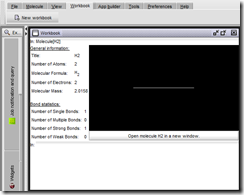
- I will be experimenting with symbolic language interface for MeTA Studio in coming weeks. A simple demo interface has been added for this purpose and is called a Workbook (accessible from Workbook –> New workbook). The only symbol currently interpreted is: Molecule[H2]
image

- An App Builder tool to simplify making completely new applications based on MeTA Studio runtime (accessible from App builder –> New app builder workspace). This is currently not functional, and is only a design spec.


MeTA Studio on Ohloh.net

MeTA Studio is also now hosted on Ohloh.net: https://www.ohloh.net/p/metastudio/, which currently is providing a means of on-line update. This also serves as a way of showing off the way for displaying users and developers of MeTA Studio. So if you use or develop for MeTA Studio, help spread the word, click on “I use it” Ohloh.net button at the bottom of MeTA Studio home page at: http://code.google.com/p/metastudio/


Have fun! And check out for some new updates with MeTA Studio in coming weeks.


--
Update: Just realized that this is not the case. Once a file is uploaded on Ohloh.net, it is immutable. So this issue is not fixed yet. Any suggestions on online update server place are still welcome.

Wednesday, May 20, 2009

New Binary installer for MeTA Studio

A new binary installer for MeTA Studio is released for public download. The current version is 2.0.20052009.

New in this version:
- Updates to UFF, HF APIs. HF APIs, in particular, have changed substantially to provide better access to individual parts of the algorithm.
- Improved optimiser APIs
- HF analytical gradients (seems to work, but needs to be tested thoroughly!)
- Gradual changes in graphics backend.
- Support for JNA, simplifying interfacing of native code with in MeTA Studio. The native code libraries can now be easily interfaced from BeanShell or Jython support for MeTA Studio. Expect more information on this in coming days.
- Number of added scripts in 'scripts/' directory
- Numerous bug fixes, as usual ;-)
- And a Linux (x86) installer
- Windows installer on Vista and Windows 7 no longer requires UAC prompt.

Note: If you are compiling MeTA Studio from source, you would need to update the dependent libraries (bsh.jar and jna.jar). While there are substantial changes to BeanShell library (bsh.jar), jna.jar is newly added to support calling native code.

Get all the code here: http://code.google.com/p/metastudio/

enjoy this version!


(Update: There were some glitches reported with the binary distribution, especially missing jna.jar in the Windows installer. I have subsequently updated all the binary distributions to v 2.0.27052009)
(Another Update: Found some really nasty bugs, and had to fix them, so the latest is now v 2.0.04062009 .. this binary release turns out to be a bit expensive, given that I am yet to move to a new online-update mechanism).